
How to Convert Wells Fargo Bank Statements to Excel and CSV
A step-by-step guide to export your Wells Fargo bank statements into powerful spreadsheet formats for bookkeeping and tax purposes.
Managing your financial data efficiently is essential especially when your bank statements are stuck in static PDF files. If you’re a Wells Fargo customer, you might have wondered: how to export Wells Fargo statements to Excel, or even how to download Wells Fargo statements in CSV format for budgeting, accounting, or tax reporting.
This step-by-step guide will teach you how to convert your Wells Fargo bank statements into editable Excel and CSV formats. Whether you're organizing your personal Way2Save transactions, managing an Everyday Checking account, or preparing financial records for tools like QuickBooks, Sage, or Xero, this process is designed to be straightforward and efficient. We’ll also introduce StatementSheet, the ultimate bank statement converter designed to turn your PDF files into structured and editable spreadsheets.
Can You Export Wells Fargo Bank Statements Directly in Excel or CSV ?
Short Answer: It depends which part of Wells Fargo Online you use, and the distinction matters.
From the account activity area, Wells Fargo does let you export transactions. Using "Download Account Activity" you can save a Comma Delimited (ASCII/Spreadsheet) CSV or a Quicken Web Connect (.QFX) file. By default this captures the last 90 days, and up to 18 months of activity is available for certain account types if you choose an extended time frame. So for recent transactions, you can get a spreadsheet without touching a PDF.
The formal statements are a different product. From "Statements & Documents", your only option is the PDF, there is no CSV, QBO or QFX export from the statements section itself. And the CSV activity file leaves out the account summary, beginning and ending balances and fees that the monthly statement includes.
So whenever your data is older than the 18-month activity window, or you need the formal statement for an audit or loan file, you download the PDF and convert it. That’s where StatementSheet comes in, turning the Wells Fargo PDF into a clean Excel or CSV file.
Why Convert Wells Fargo PDF Bank Statements to Excel or CSV?
Here’s why transforming your PDF bank statements from Wells Fargo into spreadsheet formats like Excel (.xlsx) or CSV is more than just convenient, it’s a financial game-changer:
- Reach history the activity download can'tThe activity export stops at 18 months, while deposit-account statements are available as PDFs for up to 7 years. Converting the PDFs is the practical way to rebuild older periods for a tax audit, a Schedule C, or a mortgage file.
- Streamlined Tax ReportingWhether you're self-employed or filing a Schedule C, CSV files allow you to categorize deductions quickly, organize account numbers, and prepare for tax filing with the IRS.
- Seamless Accounting Software IntegrationTools like QuickBooks, Xero, and Sage support CSV imports. Once converted, your Wells Fargo data flows smoothly into your accounting system, helping you stay compliant with U.S. tax laws and audit-ready.
- Get the balances a CSV feed omitsThe activity CSV gives you raw rows, but the monthly PDF statement carries the beginning and ending balances and fees that a mortgage application, reconciliation, or audit actually needs.
Wells Fargo Activity Download vs. PDF Statement: Which Should You Use?
Wells Fargo gives you two different data products. The right one depends on how far back you need to go and whether you need the formal statement.
| Feature | Download Account Activity | PDF statement (converted) |
|---|---|---|
| History covered | 90 days default, up to 18 months (some accounts) | Up to 7 years for deposit accounts |
| Formats | CSV (Comma Delimited), QFX (Quicken) | Excel (.xlsx) or CSV after conversion |
| Includes balances & fees | No | Yes |
| Credit card history | Up to 90 days or 300 transactions | Full statement per cycle |
| Best for | Recent rows for import | Audits, loans, multi-year history |
Rule of thumb: for the last few months, use Download Account Activity; for the official statement, older periods, or a full tax year, convert the PDF to CSV (for accounting imports) or Excel (for analysis).
Why Use StatementSheet ?
StatementSheet is a reliable and powerful PDF-to-Excel converter designed to turn bank statements into structured, actionable data. If you're wondering how to convert Wells Fargo statements to Excel or CSV, this tool is your solution.
- ✔️ Accurate Extraction of transaction data from digital and scanned PDFs using OCR technology
- ✔️ Converts files into Excel (.xlsx) or CSV formats within seconds
- ✔️ Keeps Wells Fargo's columns intact: Date, Description, Deposits/Additions, Withdrawals/Subtractions, Ending Daily Balance
- ✔️ Merges multi-line descriptions (wrapped merchant names and ACH references) into one clean row
- ✔️ Strips the repeated page headers and footers so they don't become transaction rows
- ✔️ Separates linked accounts on a Combined Statement into their own data
- ✔️ Supports USD ($) and U.S. date formats (MM/DD/YYYY)
- ✔️ Safe, encrypted, and compliant with U.S. data privacy standards
Which Wells Fargo Documents Can You Convert?
StatementSheet works across the full range of Wells Fargo statement types, including:
- Everyday Checking and Way2Save Savings statements
- Wells Fargo credit card statements (Active Cash, Autograph, Reflect)
- Business checking and Business Online statements
- Combined Statements with several linked accounts in one PDF
- Digital PDFs and scanned or photographed paper statements
How to Convert Wells Fargo PDF Bank Statements in Four Easy Steps
Here’s how to use StatementSheet to convert your Wells Fargo PDF statements into Excel or CSV:
Step 1: Download Your Wells Fargo PDF Bank Statement
- Log in to your Wells Fargo Online Banking portal
- Go to "Statements & Documents" and choose the account (e.g., Everyday Checking, business checking)
- Select the statement you need (you can select only one statement at a time)
- Click the download icon and save the PDF to your computer
If you only need recent rows instead, use "Download Account Activity" under the Accounts tab, pick a date range and choose Comma Delimited (CSV) or Quicken Web Connect (QFX). Remember this covers 90 days by default (up to 18 months for some accounts), and credit card history is capped at about 90 days or 300 transactions, so older periods come from the PDF.
Step 2: Upload your PDF Bank Statement

Step 3: Our smart engine converts it to a structured Excel or CSV file.

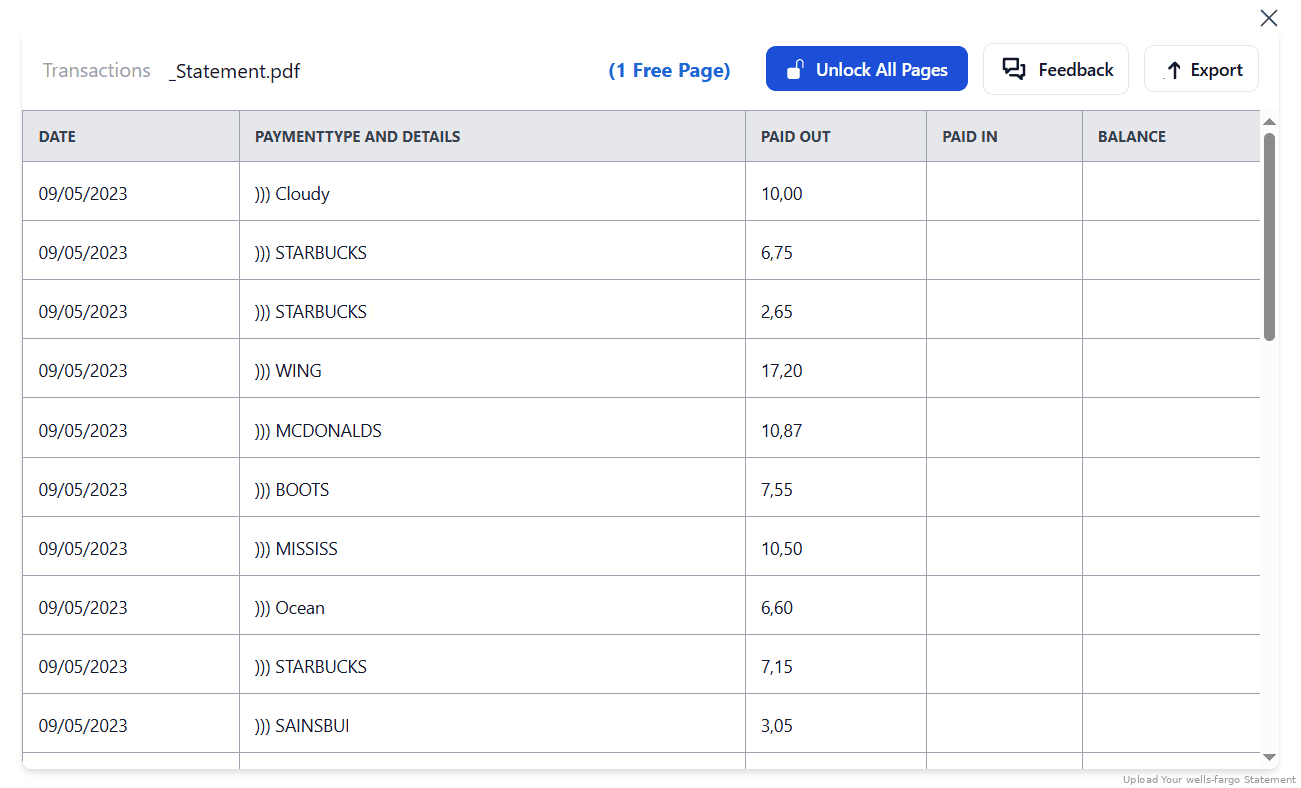
Step 4: Check result & Download your converted document instantly
Can You Convert Wells Fargo Statements Manually?
You can try, but Wells Fargo PDFs are among the trickier ones to copy by hand. Selecting text from the statement tends to produce garbled columns and merged rows, and the split Deposits/Additions and Withdrawals/Subtractions columns rarely line up once pasted into Excel.
Two Wells Fargo quirks make it worse. Transaction descriptions frequently wrap onto a second or third line when merchant names or ACH references are long, so a single transaction breaks across rows. And Wells Fargo repeats the account header and footer on every page, which basic tools mistake for transaction rows. Combined Statements add another layer, with several linked accounts stacked in one PDF.
An automated converter merges the wrapped descriptions into one row, strips the repeated headers, separates the linked accounts, and keeps the Date / Description / Deposits / Withdrawals / Ending Daily Balance columns intact, which is why the four-step method above is the reliable route beyond a single clean page.
Related Guides
More American Bank Guides:
Frequently Asked Questions
Can I download Wells Fargo statements in Excel format ?
Not as Excel directly. You can export recent activity as CSV or QFX (up to 90 days by default, 18 months for some accounts), and the formal statements are PDF only. Use StatementSheet to convert a statement PDF into an Excel spreadsheet.
How to download a CSV file from Wells Fargo ?
Use "Download Account Activity" under the Accounts tab and choose the Comma Delimited (spreadsheet) format. This works for recent activity only; for full statements or older history, download the PDF and convert it with StatementSheet.
How far back can I get Wells Fargo statements?
It depends on the product: up to 12 months for auto loans; up to 2 years for credit cards, HELOCs and personal loans; and up to 7 years for deposit accounts, mortgages and managed investment accounts. The activity CSV export only reaches about 18 months, so older data comes from converting the PDF.
Does StatementSheet support scanned or photographed PDFs?
Yes. Its OCR engine reads text from scanned bank statements effectively. For best results, ensure your scans are clear and well-lit.
Can I use the converted file with QuickBooks or Xero?
Yes, the exported CSV files are formatted for seamless imports into QuickBooks, Xero, and Sage accounting systems.
Does this work for both personal and business Wells Fargo accounts?
Yes. StatementSheet supports all major Wells Fargo account types, including Combined Statements, business checking, and credit card accounts.
Tips for Organizing Your Converted Wells Fargo Statements
Once your PDF statements have been converted to Excel or CSV, take full control of your financial data:
- Sort transactions by date, payee, category, or check numberEasily monitor your monthly spending patterns, whether it’s recurring debit payments like rent, utilities, or automatic transfers from your Way2Save Savings.
- Check the wrapped descriptions came through wholeWells Fargo descriptions often wrap across lines. After converting, spot-check that long merchant names and ACH references stayed on a single row before you categorize for a Schedule C.
- Use Excel pivot tables for financial insightsGenerate dynamic reports for your Wells Fargo checking or business account activity. Summarize data by month, vendor, or type of expense to support budgeting or financial planning.
- Organize your spreadsheets by account number and date formatSave files using clear naming conventions like “WF_CombinedStatement_2024-03.xlsx” to quickly locate documents for tax filing, loan applications, or audit requests.
- Store converted statements securely in the cloudUse encrypted cloud services such as OneDrive, Dropbox, or Google Drive to back up your Excel or CSV files, and to keep records beyond Wells Fargo's product-specific online windows.
Troubleshooting Common Wells Fargo Conversion Issues
- Descriptions split across rowsWells Fargo wraps long merchant names and ACH references onto extra lines. A rough copy-paste breaks a transaction across two or three rows. A good converter merges them back into one, so check the row count matches the statement.
- Page headers showing up as transactionsWells Fargo repeats the account header and footer on every page. Basic OCR reads these as data. Make sure your converted file has no header text sitting in the transaction rows.
- Activity export won't go back far enoughThe activity download caps at about 18 months (and credit card history at roughly 90 days or 300 transactions). For older periods, download the PDF statement, deposit-account PDFs go back up to 7 years, and convert that instead.
- One PDF holds several accountsA Wells Fargo Combined Statement stacks linked accounts in one PDF. Convert as normal, then separate the accounts in your spreadsheet (StatementSheet keeps each account's rows distinct).
Final Thoughts: Take Charge of Your Finances Today
Static PDFs are great for viewing your bank statement, but when it comes to analysis, reporting, and digital recordkeeping, they fall short. Wells Fargo's native activity download helps with recent rows, but it doesn't reach older history or match the formal statement. Using StatementSheet, you can turn your Wells Fargo PDF statements into Excel or CSV files securely and accurately.
Whether you're preparing for tax filing, reconciling your transactions, or importing data into QuickBooks, don't let outdated formats slow you down.
Ready to convert your Wells Fargo statement to Excel or CSV?
➡️ Visit StatementSheet and unlock your bank data today.