
How to Convert PNC Bank Statements to Excel and CSV
A step-by-step guide to export your PNC bank statements into usable spreadsheet formats
Managing your personal or business banking records is essential, especially for budgeting, taxes, or financial reporting. PNC does let you export transactions, but the rules change at the 90-day mark in a way that catches almost everyone out.
If you’ve searched terms like “export PNC statements to Excel”, “PNC statement to CSV file”, or “download PNC bank statements to CSV”, you’ve probably hit the wall: QFX and QBO only reach back 90 days, and older data comes as CSV, one month at a time. The good news? You can convert the full statements easily using StatementSheet, the tool that turns PDF Bank Statements into structured spreadsheets.
Whether you're managing personal banking, business banking, or credit cards, this guide shows you exactly what PNC gives you, where it breaks, and how to convert your statements to Excel or CSV.
Can You Download PNC Bank Statements Directly in Excel or CSV?
Short answer: yes, but PNC splits it across two systems that don't talk to each other.
PNC lets you export transactions in .QFX (for Quicken) or .QBO (for QuickBooks) via Web Connect. The catch is the 90-day wall: those formats only cover the last 90 days. Users regularly report seeing two years of transactions on the PNC website, exporting a QFX, and finding only 90 days actually import.
Beyond 90 days, PNC switches you to CSV, and hides it. The path is My Account, then Activity, then Online Statements, then Activity Detail. There you choose whether to export deposits or withdrawals (they're separate exports), pick a date range, and click Export. Users report PNC now limits this to one month at a time, and the CSV loses much of the transaction detail QFX carries. One customer was told by a PNC phone rep that CSV export wasn't possible at all, and only got the steps after complaining publicly.
The official statement, the one you'd use for taxes, audits or a loan application, is always a PDF, with up to 7 years available. So for a full tax year, complete transaction detail, or anything an accountant will scrutinise, download the PDF and convert it with StatementSheet.
Why Convert PNC PDF Bank Statements to Excel or CSV?
PNC's native exports work for recent activity, but they collapse exactly when you need a year of data.
- Skip the one-month-at-a-time grindPast 90 days, PNC's CSV export runs one month at a time, and separately for deposits and withdrawals. A single tax year can mean 24 separate downloads. Converting twelve PDF statements is dramatically faster.
- Keep the transaction detail CSV dropsPNC's CSV strips much of the transaction detail that QFX preserves. Converting the PDF statement keeps the full description, which matters when you're categorising or tracing a payment months later.
- Fix the QFX 90-day import problemYou can see two years on the PNC site, export a QFX, and still only get 90 days into Quicken. Converting the archived PDFs gives you a file that carries the whole period.
- Tax preparation & reportingIf you're self-employed or manage rental properties, structured data helps with Schedule C, 1099s, or submitting records to your accountant for federal or state taxes.
- Merge deposits and withdrawals back togetherPNC's Activity Detail export makes you pick deposits or withdrawals, never both. A converted statement gives you one chronological ledger with both sides, ready for reconciliation.
PNC Export Options Compared: The 90-Day Wall
PNC's format depends entirely on how far back you're reaching. Here's what you actually get.
| Feature | QFX / QBO (Web Connect) | CSV (Activity Detail) | PDF statement (converted) |
|---|---|---|---|
| History covered | Last 90 days only | Older, one month at a time | Up to 7 years |
| Deposits & withdrawals together | Yes | No (separate exports) | Yes |
| Full transaction detail | Yes | Reduced | Yes |
| Opens in Excel | No (Quicken/QuickBooks only) | Yes | Yes (.xlsx or .csv) |
| Best for | Keeping Quicken current | One recent month | Tax years, audits, loan files |
Rule of thumb: inside 90 days, use QFX or QBO. Beyond it, don't fight the one-month CSV export, download the PDF statements and convert them to CSV (for accounting) or Excel (for analysis).
Why Use StatementSheet?
If you're looking to export PNC statements to Excel or get your PNC statement to CSV file, StatementSheet handles the periods PNC's native exports can't.
- ✔️ Converts a full year of statements at once, instead of PNC's one-month CSV limit
- ✔️ Keeps deposits and withdrawals in one chronological ledger
- ✔️ Preserves the full transaction detail that PNC's CSV strips out
- ✔️ Reaches the 7-year statement archive, well past the 90-day QFX wall
- ✔️ Converts scanned or digital PNC PDFs into CSV or Excel (.xlsx)
- ✔️ Full support for USD formatting and US bank layouts
- ✔️ Handles checking, savings, credit cards, personal and business banking
- ✔️ Fast, secure, and private, data is deleted after processing
Which PNC Documents Can You Convert?
StatementSheet works across the full range of PNC statement types, including:
- PNC Virtual Wallet statements (Spend, Reserve, Growth)
- PNC checking and savings account statements
- PNC credit card statements
- Business checking and business banking statements
- Archived PDF statements from PNC's 7-year window, plus scanned copies
How to Convert PNC PDF Bank Statements in Four Easy Steps
Here’s how you can convert your PNC PDF bank statements using StatementSheet.
Step 1: Download Your PNC PDF Bank Statement
- Log in to your PNC online banking account
- Click My Account, then Activity, then Online Statements
- Choose the account and the statement period you need (up to 7 years are available)
- Download the PDF and save it to your computer
Want the native export instead? Within 90 days, use the Export button and pick Quicken (.QFX) or QuickBooks (.QBO). For older data, go to Online Statements, then Activity Detail, select deposits or withdrawals, choose a date range and click Export for a CSV. Expect to repeat that for each month and each activity type, and to lose some transaction detail along the way.
Step 2: Upload your PDF Bank Statement

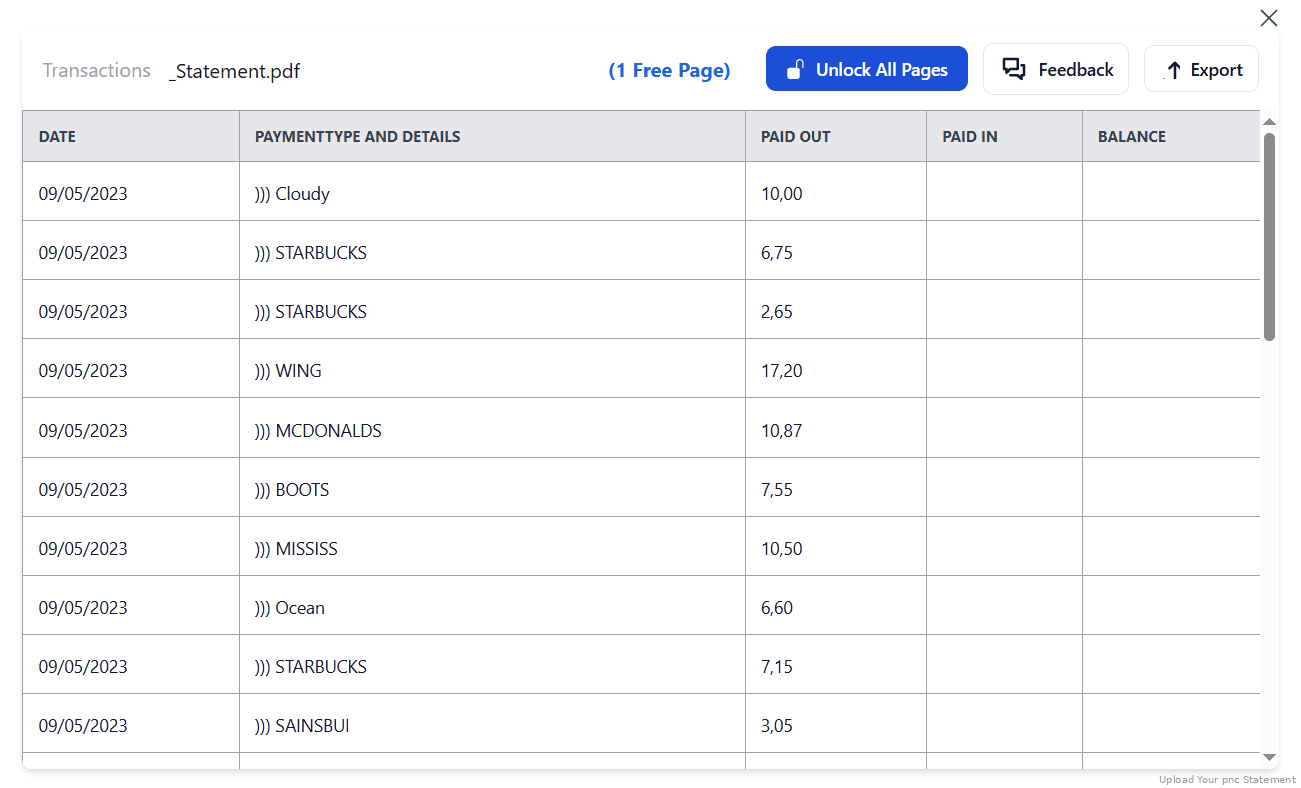
Step 3: Our smart engine converts it to a structured Excel or CSV file.

Step 4: Check result & Download your converted document instantly
Can You Convert PNC Statements Manually?
You can, but PNC's own export design shows why it's painful. Rebuilding a year means downloading each month separately, then downloading deposits and withdrawals separately again, then merging 24 files into one chronological ledger with consistent signs. Any month you miss silently breaks your running balance.
Copying from the PDF isn't better. PNC statements interleave the transaction table with account summaries and daily balance sections, and the CSV route sacrifices the transaction detail you'd need to categorise anything afterwards. Debits and credits also need standardising before totals will tie out.
An automated converter takes the whole statement, keeps deposits and withdrawals in one ordered ledger, preserves the full description, normalises debits and credits, and checks the totals against the statement's balances, which is why the four-step method above is the reliable route for a tax year or a loan package.
Related Guides
More American Bank Guides:
Frequently Asked Questions
How do I download my PNC transactions in CSV?
It's well hidden. Go to My Account, then Activity, then Online Statements, then Activity Detail. Choose deposits or withdrawals, set a date range, and click Export. Users report it's limited to one month at a time. For a full statement, download the PDF and convert it with StatementSheet.
Why does my PNC QFX only import 90 days into Quicken?
PNC's Web Connect QFX and QBO files only carry the last 90 days, even if the website displays two years. Anything older comes as CSV or PDF. Converting the archived PDF statements gives you the full period in one file.
Why are deposits and withdrawals in separate files?
PNC's Activity Detail export makes you pick one activity type per export. Rebuilding a month means merging two files. A converted PDF statement gives you both sides in one chronological ledger.
Can I export PNC bank statements to Excel?
Not as an Excel file. PNC offers QFX, QBO and a limited CSV, but no .xlsx. Upload your downloaded PDF statement to StatementSheet and it will convert it to a clean Excel workbook.
Can it handle scanned or photographed PNC statements?
Yes, as long as the scan is clear. The tool uses OCR technology to read and convert the statement into spreadsheet format.
Does PNC charge for accessing PDF statements?
No. PDF bank statements are freely accessible via PNC online banking. You can download up to 7 years of statements depending on your account type.
Tips for Organizing Your PNC Bank Statements
Once you've converted your PNC statements to CSV or Excel, here are some best practices for managing them:
- Check no month is missingIf you assembled data from PNC's one-month exports, verify the running balance carries across month boundaries. A silently skipped month is the most common PNC reconciliation error.
- Merge deposits and withdrawals with a signed amountWhen combining PNC's two activity exports, standardise into one signed Amount column (outflows negative) before building pivot tables.
- Use Excel pivot tablesSummarize your expenses, income, or categorize debit/credit activity from your PNC bank account.
- Keep files organized by account and timeEspecially important if you use both personal and business banking with PNC, or several Virtual Wallet accounts.
- Store securely in the cloudUse platforms like Dropbox, Google Drive, or iCloud, and keep converted copies beyond PNC's 7-year online window.
Troubleshooting Common PNC Conversion Issues
- A PNC rep told you CSV export isn't possibleIt is, and phone support has denied it before. The link sits under My Account, Activity, Online Statements, Activity Detail. It's easy to miss because it isn't on the main statements page.
- Only 90 days imported into QuickenThat's the Web Connect limit, regardless of the date range you selected on the website. Open the .QFX in a text editor to confirm, then use converted PDF statements for older periods.
- Your CSV is missing transaction detailsPNC's CSV carries less detail than its QFX. If you need full descriptions for categorisation, convert the PDF statement rather than relying on the CSV export.
- Your export only has half the transactionsYou exported only deposits, or only withdrawals. PNC treats them as separate exports. Run both, or convert the statement PDF which contains everything.
Final Thoughts: Simplify Your Financial Management
PNC does export your transactions, but the 90-day wall, the one-month CSV limit, the separate deposit and withdrawal files, and the lost transaction detail turn a simple tax-year export into an afternoon of work.
Whether you need a PNC statement to CSV file for your CPA or want to export PNC statements to Excel for your budget, StatementSheet converts the full PDF statement in seconds. No more manual data entry, no more merging two dozen files.
Take full control of your banking data in just a few clicks.
➡️ Visit StatementSheet now and convert your PDF bank statements.