
How to Convert M&T Bank Statements to Excel and CSV
A step-by-step guide to export your M&T bank statements into usable spreadsheet formats.
Managing your financial records can feel overwhelming, especially when your bank statements are available only in static PDF format. If you're an M&T customer, you might be searching for a way to convert your m&t bank statement to a spreadsheet file. Queries like m&t export to Excel, m&t csv statements, or how to download m and t bank statement to CSV are common, and the answer is unusually blunt.
M&T is one of the few U.S. banks with no spreadsheet export at all. Whether you're managing business banking, credit cards, or organizing your personal banking activity, getting your transaction data into Excel or CSV means converting the PDF.
This guide will show you how to convert M&T Bank PDF statements to Excel or CSV using StatementSheet, the ultimate tool to convert PDF bank statements quickly and accurately.
Can You Download M&T Bank Statements Directly in Excel or CSV?
Short Answer: No, and M&T is stricter than most.
M&T's online banking has no download-as-CSV option for any account type, whether personal, business, or commercial. Unlike Chase or Bank of America, M&T doesn't even let you manually download a QBO or QFX file from its website. There is no Activity page export to fall back on. Statements come as PDFs, and M&T keeps up to 7 years of eStatements online.
There is one native route: M&T Direct Connect. It links your accounts to Quicken or QuickBooks so you can import transaction data instead of entering it manually. Two catches. Direct Connect only pulls roughly the last 90 days of transactions, so anything older still requires PDF statements. And accessing your data through bank feeds carries a fee, commonly reported at $9.95 per month.
So if you're looking for a “Download CSV” or “Export to Excel” option in the dropdown menu, you genuinely won't find one. Downloading the PDF and converting it is the practical path, and that's where a secure tool like StatementSheet comes in.
Why Convert M&T PDF Bank Statements to Excel or CSV?
With no spreadsheet export whatsoever, conversion isn't a convenience, it's the only route from an M&T statement to usable data:
- There is no alternativeNo CSV, no Excel, no QBO, no QFX download for any account type. Retyping every line is the alternative, so converting the PDF is how you get a spreadsheet at all.
- Backfill QuickBooks beyond 90 daysDirect Connect only pulls about 90 days. If QuickBooks is missing older transactions, the historical PDF statements are the only source, and they need converting first.
- Avoid the monthly bank feed feeAccessing M&T data through bank feeds is commonly billed at $9.95 per month. For a bookkeeper handling a client's back-year records, converting the PDFs sidesteps a recurring cost for one-off work.
- U.S. Tax PreparationFor individuals filing with the IRS or preparing Schedule C or E forms, having your statement period data organized by date range in CSV makes tax filing faster and more accurate.
- Handle 7 years of records for audits and SBA loansM&T keeps 7 years of eStatements online. For a tax audit, an SBA loan application, or a legal matter, batch-converting those PDFs turns a stack of documents into a searchable ledger.
M&T Direct Connect vs. PDF Statement: What Are Your Options?
M&T gives you exactly two ways to get data out, and neither is a spreadsheet download.
| Feature | Direct Connect | PDF statement (converted) |
|---|---|---|
| History covered | ~90 days | Up to 7 years of eStatements |
| Cost | Bank feed fees may apply (~$9.95/month) | Statements are free to download |
| Output | Syncs into Quicken/QuickBooks only | CSV, Excel (.xlsx) or QBO |
| Manual QFX/QBO file | Not available | Generated on conversion |
| Best for | Ongoing sync of recent activity | Audits, SBA loans, back-year books |
Rule of thumb: use Direct Connect to keep Quicken or QuickBooks current. For anything older than 90 days, or when you need a spreadsheet rather than a sync, convert the PDF.
Why Use StatementSheet?
Since M&T offers no spreadsheet export at all, StatementSheet gives you a secure and powerful way to turn those PDFs into structured data.
- ✔️ Normalises M&T's separate debit and credit columns into a clean, consistent format
- ✔️ Extracts only transaction rows, skipping marketing content, summary blocks and check image thumbnails
- ✔️ Handles Commercial Checking statements with daily balance summaries and account analysis sections
- ✔️ Converts legacy People's United statements from before the 2022 acquisition
- ✔️ Preserves running balances so your reconciliation ties out
- ✔️ Supports U.S. Dollars ($) and IRS-ready structured output
- ✔️ Converts both digital and scanned PDF statements, exports .csv or .xlsx
- ✔️ Secure uploads, encrypted and deleted after conversion
Which M&T Documents Can You Convert?
M&T is especially popular with small businesses across the Northeast and Mid-Atlantic. StatementSheet handles the full range:
- Personal checking and savings statements
- Business Essential Checking, Business Plus Checking and BizFlex Checking statements
- Commercial Checking statements, with account analysis and transaction groupings by type
- M&T credit card statements
- Legacy People's United statements, plus scanned or photographed paper statements
How to Convert M&T PDF Bank Statements in Four Easy Steps
Here’s how you can quickly convert your M&T Bank PDF statements into Excel or CSV.
Step 1: Download Your M&T PDF Bank Statement
- Log in to your M&T Bank Online Banking portal
- Open the Statements section and choose the account from the dropdown menu
- Select the statement period you need (up to 7 years of eStatements are kept online)
- Download the PDF and save it to your device
Not yet enrolled in eStatements? Select "Statement Delivery Settings" from the menu and accept the Digital Service Agreement. There is no CSV, Excel, QBO or QFX download anywhere in the portal, so the PDF is always your starting point. Direct Connect can sync recent activity to Quicken or QuickBooks, but only about 90 days, and bank feed fees may apply.
Step 2: Upload your PDF Bank Statement

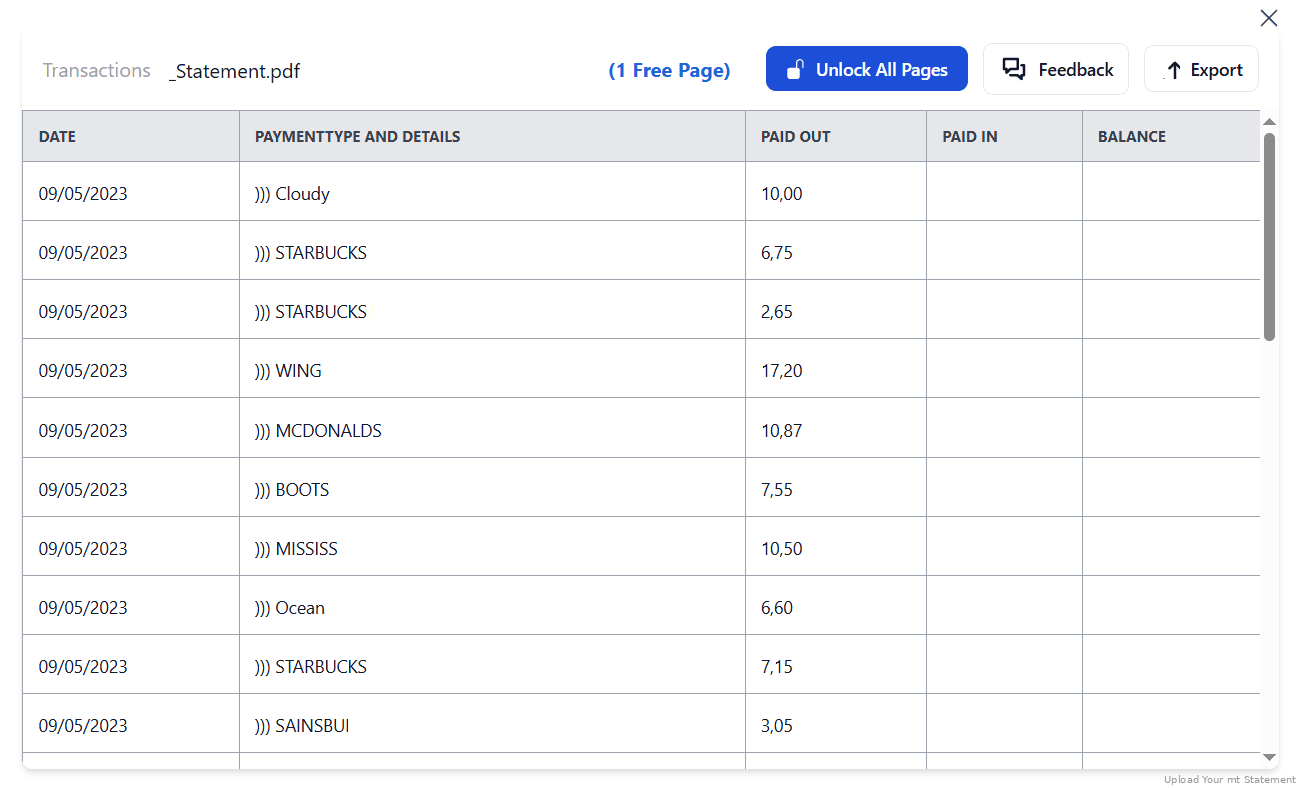
Step 3: Our smart engine converts it to a structured Excel or CSV file.

Step 4: Check result & Download your converted document instantly
Can You Convert M&T Statements Manually?
M&T's small-business statements bundle transaction details with check images, account summaries and marketing content. A copy-paste pulls all of it in, so check thumbnails and summary blocks end up interleaved with your actual transaction rows and have to be picked out by hand.
Commercial Checking statements are worse. They can carry a daily balance summary, an account analysis section listing service charges and collected balances, and transactions grouped by type (deposits, electronic payments, wire transfers, fees) rather than listed chronologically. Add M&T's separate debit and credit columns, which need normalising before any accounting import, and a manual rebuild of a single month becomes an afternoon.
An automated converter isolates the transaction rows, skips the summaries and check images, normalises the debit and credit columns, and preserves the running balance so your reconciliation ties out, which is why the four-step method above is the only sensible route when no native export exists.
Related Guides
More American Bank Guides:
Frequently Asked Questions
How do I download my M&T bank statement in CSV?
You can't. M&T's online banking has no download-as-CSV option for any account type, personal, business or commercial. Download the statement as a PDF, then use StatementSheet to convert it into a CSV file.
Can I download a QFX or QBO file from M&T?
No. Unlike Chase or Bank of America, M&T doesn't offer a manual QBO or QFX download from its website. Your only native option is Direct Connect with Quicken or QuickBooks, otherwise you work from PDFs.
What is M&T Direct Connect, and what are its limits?
It links your M&T accounts to Quicken or QuickBooks so transaction data imports automatically. It only pulls roughly the last 90 days, and bank feed access is commonly billed at $9.95 per month. For older records, convert the PDF statements.
How far back can I get M&T statements?
M&T provides up to 7 years of electronic statements through online banking, which is what makes PDF conversion viable for tax audits, SBA loan applications or legal matters.
I was a People's United customer. Can I convert those statements?
Yes. Following the 2022 acquisition, pre-migration statements may still be accessible through M&T online banking, and StatementSheet handles the legacy People's United format too.
Can it process scanned PDFs?
Yes, StatementSheet supports OCR. Clear, high-resolution scans will provide the best results.
Does M&T charge for downloading statements?
No, M&T provides access to PDF statements for free through its online and mobile banking platforms. Fees apply to some optional services, including bank feeds.
Tips for Organizing Your M&T Bank Statements
Once your PDF is converted to CSV or Excel, here’s how to organize your data more effectively:
- Normalise the debit and credit columns firstM&T uses separate debit and credit columns. Standardise them into one signed Amount before totalling, or your pivot tables and reconciliations will come out backwards.
- Strip account analysis rows from commercial statementsService charges and collected balances in the account analysis section aren't transactions. Keep them out of your ledger, but keep the file for your records.
- Use pivot tables for reportsIdeal for business users tracking categories or creating summaries across Business Essential, Business Plus or BizFlex accounts.
- Batch-convert a full year at onceIf QuickBooks is missing history because Direct Connect only reached 90 days, pull the whole run of PDFs from M&T's 7-year archive and convert them together.
- Secure your converted filesStore files in encrypted cloud platforms like Google Drive or Dropbox, and keep copies beyond M&T's 7-year online window.
Troubleshooting Common M&T Conversion Issues
- You can't find any export optionIt doesn't exist. M&T has no CSV, Excel, QBO or QFX download for personal, business or commercial accounts. The PDF statement is your only export.
- QuickBooks is missing older transactionsDirect Connect only pulls about 90 days. Download the historical PDF statements and convert them to QBO or CSV for import instead.
- Check images and summaries in your transaction rowsM&T small-business statements include check thumbnails, account summaries and marketing content. A good converter extracts only the transaction rows, so verify none of that leaked through.
- Commercial transactions aren't in date orderCommercial Checking statements group transactions by type (deposits, electronic payments, wire transfers, fees) rather than chronologically. Re-sort by date after conversion before reconciling.
Final Thoughts: Gain Control Over Your Finances
M&T is one of the few U.S. banks that offers no spreadsheet export whatsoever: no CSV, no Excel, not even a manual QFX or QBO file. Direct Connect helps keep Quicken current, but stops at 90 days and can carry a monthly fee.
With StatementSheet, you can skip the manual entry, convert 7 years of eStatements into clean spreadsheets, and focus on what matters: understanding your money and making informed decisions.
➡️ Ready to convert your M&T Bank statement to Excel or CSV?
Visit StatementSheet to convert PDF bank statements today.