
How to Convert Citibank Bank Statements to Excel and CSV
A step-by-step guide to export your Citibank bank and credit card statements into spreadsheet formats.
Managing personal banking or business banking records gets frustrating when your export stops at 180 days and your credit card refuses the format your accounting software wants. If you're a Citibank customer, you've probably searched for how to download a Citibank statement in Excel, and found the answer depends entirely on which account you're looking at.
This guide explains exactly what Citibank exports, where the 180-day wall sits, and introduces StatementSheet, a smart online tool that converts your PDF statements into clean, usable spreadsheets in a few clicks.
Can You Download Citibank Statements Directly in Excel or CSV?
Short Answer: yes for transactions within 180 days, no for the statement, and credit accounts are restricted further.
Citibank does export. Log in, select your account, navigate to the transaction history for your date range, and in the pop-up window choose "CSV - Spreadsheets", then Download. You can access up to 180 days of banking activity in spreadsheet format.
On CitiBusiness Online, the same 180-day download covers Checking, Insured Money Market, Savings and Credit accounts, with a choice of CSV, CSX (a CSV variant carrying extra columns for the BAI transaction code and check number) or BAI2. One restriction catches people out: credit account activity cannot be downloaded in QBO or QFX format at all. And Citi's own help pages warn that pop-up blockers break the download, recommending you hold the CTRL key before clicking Download Activity.
The official statements stay PDFs. So for anything beyond 180 days, a credit card file QuickBooks will accept, or the statement itself for a lender or the IRS, download the PDF and convert it with StatementSheet.
Why Convert Citibank PDF Bank Statements to Excel or CSV?
Citibank's export works inside a narrow window. Converting the PDF statement covers what it can't:
- Reach past the 180-day wallCitibank gives you up to 180 days of activity in spreadsheet format. A full tax year is 365. Anything older exists only as a PDF statement, and manually retyping it is where the errors start.
- Get a QBO file for your credit cardCredit account activity cannot be downloaded as QBO or QFX from Citi. If QuickBooks Desktop or Quicken is your destination, converting the card statement PDF is the only route to a file they'll accept.
- Easier Tax Filing with the IRSHaving bank and credit card transaction data in CSV makes it easier to report deductible expenses, track business spending, and prepare filings for Form 1040, Schedule C, or corporate returns.
- Financial Audits & Lending ApplicationsLenders and investors ask for the issued statement, not a transaction feed. A converted PDF gives you both the official document and the structured data behind it.
- Reconciliation Across AccountsComparing statement periods across Citibank checking, savings and credit cards is far easier in one merged workbook than in a folder of 180-day exports.
Citibank Download Activity vs. PDF Statement
What you can export depends on the account type, and none of it is the issued statement.
| Feature | Download Activity | PDF statement (converted) |
|---|---|---|
| History covered | 180 days | Your full statement archive |
| Formats | CSV, CSX, BAI2 (no QBO/QFX on credit) | Excel (.xlsx), CSV or QBO |
| Credit card support | Limited formats | Full |
| Blocked by pop-up blockers | Yes (hold CTRL) | No |
| Best for | Recent months, BAI2 into treasury tools | Tax years, audits, lenders, credit cards |
Rule of thumb: within 180 days on a deposit account, use Download Activity. Beyond it, or for any credit card heading into QuickBooks, convert the PDF.
Why Use StatementSheet?
StatementSheet is a smart online tool that converts your PDF statements into clean, usable spreadsheets in just a few clicks.
- ✔️ Reaches statements older than Citibank's 180-day download window
- ✔️ Produces QBO files for credit accounts, which Citi cannot export
- ✔️ Converts PDF statements into Excel (.xlsx) and CSV files
- ✔️ No pop-up blocker workarounds, nothing fails silently
- ✔️ Accurate data extraction for both digital and scanned PDFs
- ✔️ Supports USD ($), US date conventions and accounting standards
- ✔️ Works with all Citibank accounts, personal and business
- ✔️ Safe and secure uploads, files deleted after processing
Which Citibank Documents Can You Convert?
StatementSheet handles the full Citi range:
- Citibank checking and savings account statements
- Insured Money Market Account statements
- Citi credit card statements, including those QBO and QFX can't reach natively
- CitiBusiness Online statements, including accounts with BAI transaction codes
- Archived statements beyond 180 days, plus scanned or photographed copies
How to Convert Citibank PDF Bank Statements in Four Easy Steps
Here’s how you can convert your Citibank PDF bank statements
Step 1: Download Your Citibank PDF Bank Statement
- Log into your Citibank Online Banking account with your User ID and password
- Choose the account you want (checking, savings, or credit card)
- Select your statement period or enter a custom date range
- Download the PDF statement and save it to your computer
Want the native export instead? Navigate to the transaction history, and in the pop-up window choose "CSV - Spreadsheets" before clicking Download. Only 180 days are available. If nothing happens, your pop-up blocker is the culprit: Citi's own guidance is to hold the CTRL key before clicking Download Activity. CitiBusiness users can also pick CSX or BAI2, though credit accounts can't produce QBO or QFX.
Step 2: Upload your PDF Bank Statement

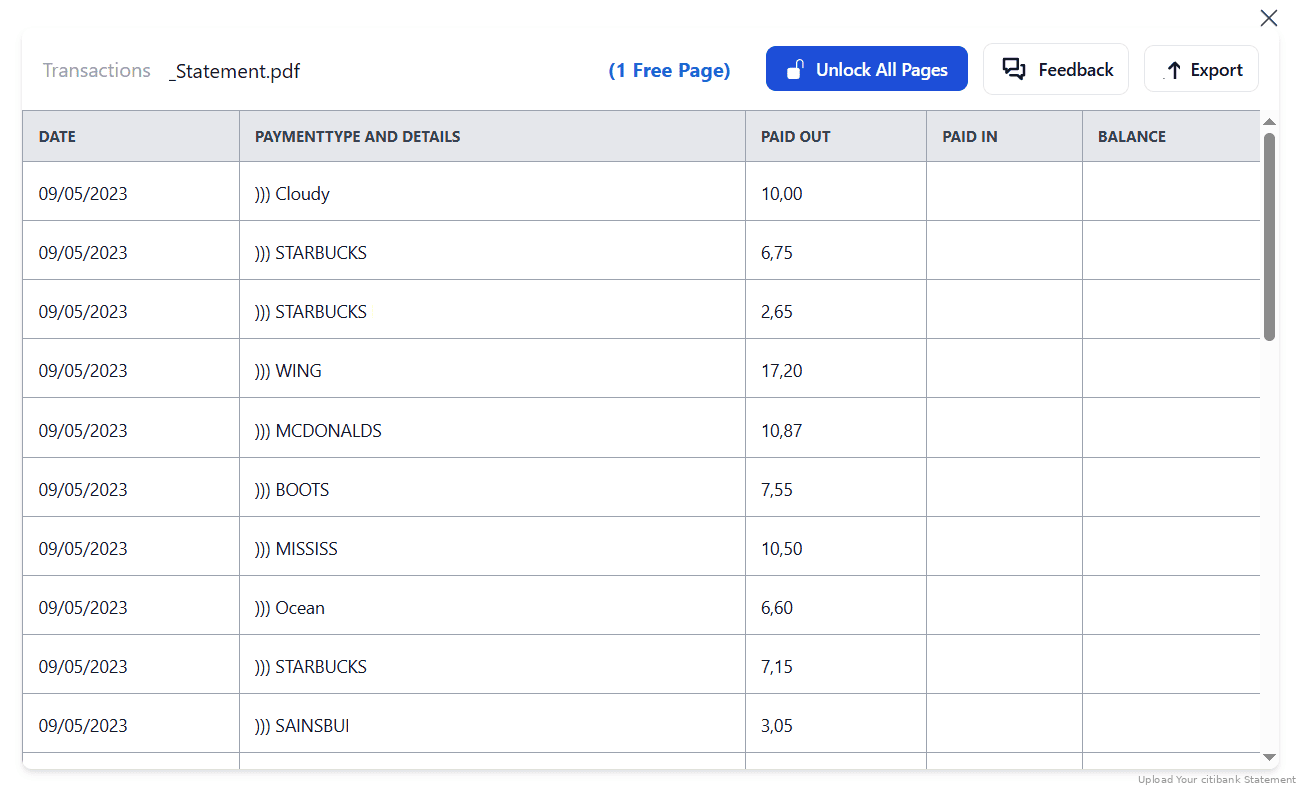
Step 3: Our smart engine converts it to a structured Excel or CSV file.

Step 4: Check result & Download your converted document instantly
Can You Convert Citibank Statements Manually?
Rebuilding a tax year from Citibank's export means at least two 180-day downloads, merged by hand, with the boundary checked so no transaction falls between them. Add a credit card, which can't produce QBO or QFX at all, and you're combining files in different formats with different conventions.
The formats themselves have quirks. CSX adds columns for the BAI transaction code and check number, which generic tools misread as extra transactions or drop entirely. Copying from the PDF instead loses column alignment across page breaks, and a figure that should be a debit lands in the balance column because of where it sat on the page.
An automated converter takes whole statements regardless of age, produces QBO for credit cards, keeps BAI codes and check numbers in their own columns, and preserves the running balance, which is why the four-step method above beats stitching exports together.
Related Guides
More American Bank Guides:
Frequently Asked Questions
How do I download my Citibank transactions in CSV?
Log in, select the account, navigate to the transaction history for your date range, and in the pop-up window choose "CSV - Spreadsheets" then Download. Only 180 days of activity are available. For older periods or the issued statement, convert the PDF with StatementSheet.
Why can't I download my Citi credit card as QBO or QFX?
Citi doesn't allow it. Credit account activity cannot be downloaded in QBO or QFX format. Converting the credit card statement PDF produces the QBO file QuickBooks needs.
I clicked Download and nothing happened. Why?
Pop-up blockers interfere with CitiBusiness Online downloads. Citi's own guidance is to press and hold the CTRL key before clicking the Download Activity button.
What is the CSX format Citi offers?
CSX is a CSV variant with additional columns for the BAI transaction code and, where applicable, the check number. Useful for treasury tools, but generic converters often mishandle those extra columns.
Will StatementSheet work for all Citibank accounts?
Yes, it supports checking, savings, Insured Money Market and credit card statements, from both personal accounts and CitiBusiness Online.
Does it support scanned PDF statements?
Yes, but the scan must be clear. StatementSheet uses OCR technology to extract data from scanned PDFs accurately.
Is there a fee to download PDF bank statements from Citibank?
No. Citibank allows free access to PDF statements via online and mobile banking platforms for most account types.
Tips for Organizing Your Citibank Bank Statements
Once you've converted your Citibank PDF statements into Excel or CSV, follow these best practices to stay organized:
- Check the boundary between 180-day exportsA tax year needs at least two downloads. Verify the running balance carries across the join, since a transaction lost at the seam won't announce itself.
- Keep BAI codes and check numbersIf you used the CSX format, those extra columns carry the BAI transaction code and check number. They're your best audit trail, so don't strip them when tidying the file.
- Use Excel pivot tables for summary reportingCreate overviews by category or vendor for use in IRS documentation or internal budgeting.
- Download check images before they expireCheck images are only available for checks posted within the last 180 days, one at a time. If a check matters to an audit, save the image while you still can.
- Store converted statements securelyUse encrypted cloud services like Google Drive, OneDrive, or Dropbox for secure backups and easy access during audits or reviews.
Troubleshooting Common Citibank Conversion Issues
- Your download never arrivesPop-up blockers break CitiBusiness Online downloads. Hold CTRL before clicking Download Activity, or work from the PDF statement instead.
- QuickBooks rejects your credit card fileCiti cannot export credit account activity as QBO or QFX. Convert the card statement PDF to QBO instead of trying to reformat a CSV by hand.
- Transactions stop after six monthsThat's the limit: 180 days of activity in spreadsheet format. Your PDF statements go further back, and converting them rebuilds the full year.
- Extra columns appear as junk rowsYou exported CSX, which adds BAI transaction codes and check numbers. Map them properly rather than deleting them, or pick plain CSV next time.
Final Thoughts: Make Your Citibank Data Work for You
Citibank does export, in CSV, CSX and BAI2. But it stops at 180 days, refuses QBO and QFX for credit accounts, and needs a CTRL-key trick to survive a pop-up blocker. None of that gives you the issued statement a lender or the IRS will ask for.
With StatementSheet, you can turn Citibank PDF statements into Excel, CSV or QBO files that reach back as far as your archive goes. Whether you're preparing for tax season, managing multiple credit cards, or running a small business, you reclaim control with accuracy, speed, and confidence.
Ready to convert your Citibank PDF statements to Excel or CSV?
➡️ Visit StatementSheet now and turn your PDFs into actionable spreadsheets.