
How to Convert NatWest Bank Statements Excel and CSV
A step-by-step guide to export your NatWest bank statements into usable spreadsheet formats.
Managing your financial records can be tedious, especially when your bank changes its PDF layout twice in three years and buries the export behind a menu that doesn't say what it does. If you're a NatWest customer, you might be wondering how to download a NatWest bank statement in Excel or CSV.
This guide explains what NatWest actually offers, the traps that break a manual conversion, and introduces StatementSheet, the ultimate bank statement converter that makes the entire process seamless.
Can You Download NatWest Bank Statements Directly in Excel or CSV ?
Short Answer: yes for transactions, no for the issued statement, and the export is well hidden.
NatWest offers PDF, CSV and OFX downloads of your transactions. On the NatWest Group platform, the export typically sits behind a menu labelled "Export to Excel", which is why so many people searching for a "CSV" or "download transactions" option scroll straight past it. Users report being able to pull up to seven years of transactions this way, though no more than twelve months at a time. Some accounts and interfaces surface a shorter window, so check yours.
Two things the export doesn't give you. It isn't the issued monthly statement, which stays a PDF and carries the opening and closing balances a lender or HMRC will expect. And despite the menu name, you don't get a true .xlsx workbook.
So use the export for recent analysis. For the formal statement, an archived year, or a properly formatted Excel file, download the PDF and convert it. That's where a trusted bank statement converter becomes essential.
Why Convert NatWest PDF Bank Statements to Excel or CSV ?
NatWest's export is more capable than most UK banks'. Converting the PDF statement covers what it can't:
- Handle a PDF layout that keeps changingNatWest has changed its PDF statement layout at least twice in the past three years, without warning. A script you wrote for last year's format produces garbage on this year's. A maintained parser keeps up.
- Rejoin descriptions that wrap onto two linesWhen NatWest wraps a card transaction description across two lines, a generic tool reads the second line as a brand new transaction. A bank-specific parser knows it belongs to the row above and joins them.
- Stitch transactions across page breaksA transaction starting at the bottom of page three with its description continuing on page four needs stitching, along with stripping repeated headers, page numbers, balance subtotals and footer text.
- Self Assessment and Making Tax DigitalBusinesses using MTD-compatible software (Xero, QuickBooks, Sage, FreeAgent) can import clean CSV transactions directly, streamlining VAT submissions and Self Assessment.
- Assemble more than twelve months at onceThe native export caps each download at twelve months. Converting a set of statement PDFs lets you merge several years into one workbook, useful for statutory accounts or a Companies House filing.
NatWest Transaction Export vs. PDF Statement: Which Should You Use?
NatWest keeps the transaction feed and the issued statement in different places, with different limits.
| Feature | Transaction export | PDF statement (converted) |
|---|---|---|
| Where | Behind an "Export to Excel" menu | Statements section |
| Formats | CSV, OFX (no true .xlsx) | Excel (.xlsx) or CSV |
| Period per download | Up to 12 months at a time | Any statements you merge |
| Opening and closing balances | No | Yes |
| Best for | Recent analysis, budgeting | HMRC, lenders, statutory accounts |
Rule of thumb: within twelve months, the native export is genuinely good. Beyond that, or when the statement itself is the evidence, convert the PDF to CSV (for accounting) or Excel (for analysis).
Why Use StatementSheet ?
If you're looking to convert a NatWest bank statement to CSV or Excel with accuracy, StatementSheet is the solution. It extracts transaction details from PDF files and converts them into structured spreadsheets in a few clicks.
- ✔️ Keeps up with NatWest's PDF layout, which has changed at least twice since 2021
- ✔️ Rejoins card transaction descriptions that wrap onto a second line
- ✔️ Stitches transactions that span a page break, and strips repeated headers and page numbers
- ✔️ Preserves the opening and closing balances the transaction export omits
- ✔️ Merges more than twelve months into one workbook
- ✔️ Full support for GBP (£) and DD/MM/YYYY dates
- ✔️ Built for HMRC and MTD, compatible with Xero UK, QuickBooks UK, FreeAgent and Sage UK
- ✔️ Secure, private, UK GDPR-compliant, files deleted after processing
Which NatWest Documents Can You Convert?
StatementSheet works across the NatWest range, including:
- Select, Reward and Premier current account statements
- NatWest credit card statements, including Reward Credit Card
- Business banking and joint account statements
- Savings account statements
- Older statements using previous NatWest PDF layouts, plus scanned copies
How to convert NatWest PDF Bank Statements in Four Easy Steps ?
Here’s how you can convert your NatWest PDF bank statements
Step 1: Download Your NatWest PDF Bank Statement
- Log in to your NatWest online banking
- Open the account summary and choose the account you need
- Go to your statements (or select 'Mailbox' in the main menu, which holds up to two years of personal account mail)
- Select the statement period, download the PDF and save it to your computer
Want the transaction export instead? Look for the menu labelled "Export to Excel", which is where the CSV and OFX options actually live. You can pull up to seven years of history, but no more than twelve months per download, and you won't get the statement's opening and closing balances.
Step 2: Upload your PDF Bank Statement

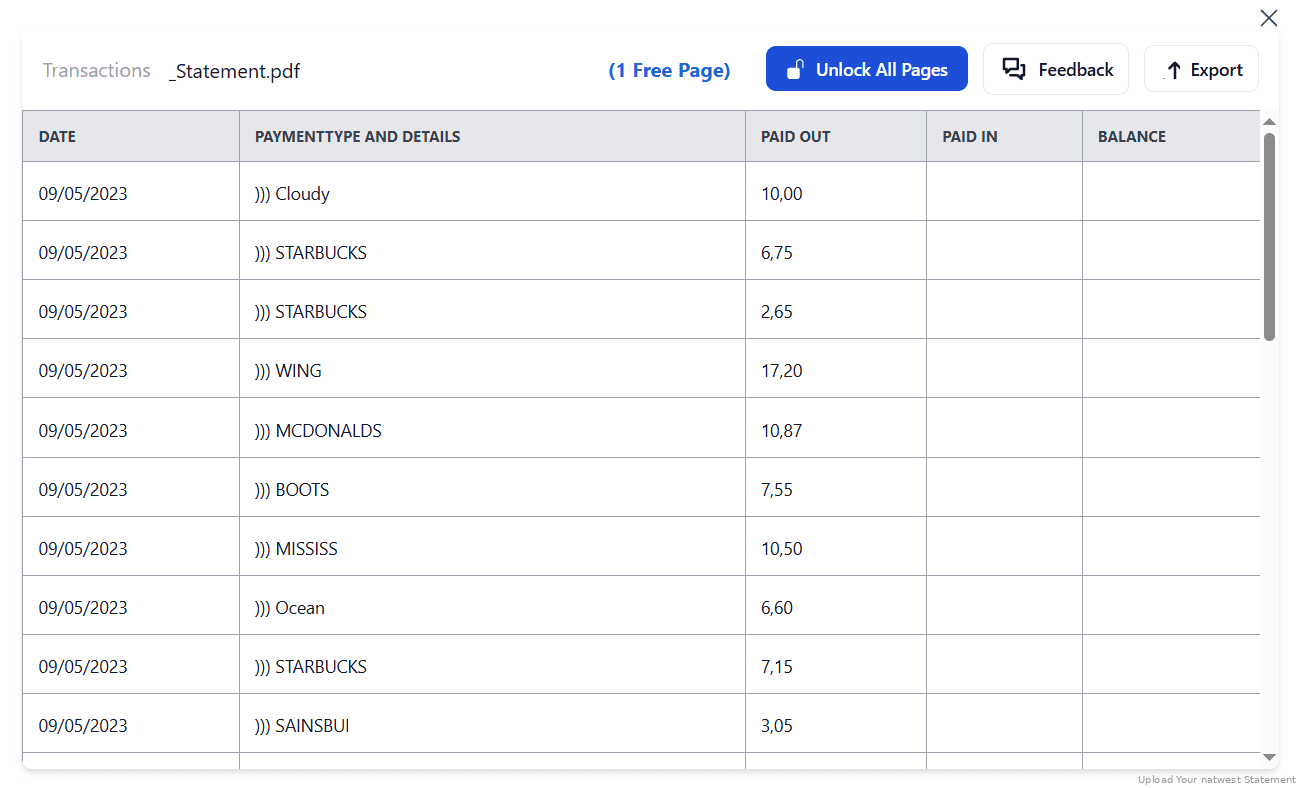
Step 3: Our smart engine converts it to a structured Excel or CSV file.

Step 4: Check result & Download your converted document instantly
Can You Convert NatWest Statements Manually?
Generic PDF tools treat every document the same. They don't know that row three is a transaction and row four is the continuation of its description. When NatWest wraps a card transaction across two lines, a copy-paste produces a phantom transaction with no amount. When a transaction begins at the bottom of page three and its description finishes on page four, it splits in two.
Then there's the moving target. NatWest has changed its PDF layout at least twice in the past three years, without notice. Any template or macro you built for the old format quietly mis-maps columns on the new one. Repeated headers, page numbers, running balance subtotals and footer text also need stripping between pages, and none of that is obvious until your totals refuse to tie.
A bank-specific converter joins wrapped descriptions, stitches transactions across page breaks, strips the page furniture, normalises DD/MM/YYYY dates, and tracks layout changes, which is why the four-step method above beats an afternoon of manual cleanup.
Related Guides
More UK Bank Guides:
Frequently Asked Questions
How do I download my NatWest transactions in CSV ?
Look for the menu labelled "Export to Excel" in Online Banking, which is where the CSV and OFX options sit. You can pull up to seven years of transactions, but no more than twelve months per download. For the issued statement, download the PDF and convert it with StatementSheet.
Can I export NatWest bank statements to Excel ?
Not as a true .xlsx file, despite the menu name. You get CSV or OFX, and the export omits the statement's opening and closing balances. Upload the PDF to StatementSheet for a clean, editable Excel workbook.
Why does my converted statement have transactions with no amount ?
NatWest wraps some card transaction descriptions across two lines, and transactions can straddle a page break. Generic tools read the continuation as a new transaction. A bank-specific parser joins them back together.
Will the tool work with all NatWest accounts ?
StatementSheet supports most personal and business NatWest statements, including Select, Reward and Premier current accounts, credit cards, joint accounts and savings accounts.
Does it support scanned or photographed statements ?
Yes. For best results, use clear scans. OCR (Optical Character Recognition) technology within StatementSheet accurately reads and converts scanned PDFs.
Does NatWest charge for downloading PDF bank statements ?
No. NatWest provides access to PDF bank statements free of charge through its online and mobile banking platforms, and up to two years of personal account mail is available in your Mailbox.
Tips for Organising Your NatWest Bank Statements
Once you've converted your NatWest PDF statements into Excel or CSV, you're in a great position to better manage your money and stay compliant with UK financial expectations. Here’s how to make the most of your converted data :
- Check for orphaned description rowsBecause NatWest wraps card descriptions onto a second line, a bad conversion leaves rows with text but no amount. Sort by the amount column and look at the blanks before trusting your totals.
- Filter by statement period or transaction typeTo identify monthly trends and monitor account activity, useful for budgeting or spotting fees like overdraft interest or non-sterling transaction charges.
- Use Excel pivot tablesTo build custom monthly reports from your NatWest Select, Reward, or Premier account activity, ideal if you're preparing documents for your accountant or planning for tax return season.
- Merge across the twelve-month capSince each native download tops out at twelve months, label converted files by account and period so a multi-year merge stays traceable, especially across personal and NatWest Business Banking accounts.
- Store converted statements securelyUsing encrypted cloud storage (OneDrive, Dropbox, iCloud), ensuring quick access in case of an HMRC query, mortgage application, or dispute.
Troubleshooting Common NatWest Conversion Issues
- You can't find the CSV exportIt's behind a menu called "Export to Excel", even though what you get is CSV or OFX. That naming is why most people conclude the feature doesn't exist.
- Your export stops at twelve monthsThat's the per-download limit. Seven years of history is available, but only twelve months at a time. For a multi-year file, convert the statement PDFs and merge them.
- Old statements convert differently to new onesNatWest has changed its PDF layout at least twice in three years. A converter with maintained bank-specific parsers handles both, where a fixed template will silently mis-map columns.
- Page headers appear as transactionsRepeated headers, page numbers, running balance subtotals and footer text all sit between pages. They need stripping, not importing, so verify none of them survived into your ledger.
Final Thoughts: Take Control of Your Finances
NatWest's export is better than most UK banks', once you find it behind the "Export to Excel" menu. But it caps at twelve months per download, omits the statement's balances, and never gives you a true Excel file.
With StatementSheet, converting NatWest PDF statements is quick, secure, and efficient: wrapped descriptions rejoined, page breaks stitched, layouts tracked as they change. Stop spending hours on manual data entry.
Ready to convert your NatWest bank statement to Excel or CSV?
➡️ Visit today StatementSheet and transform your PDFs into actionable spreadsheets.