
How to Convert RBC Bank Statements to Excel and CSV
A step-by-step guide to export your RBC bank statements into usable spreadsheet formats
Managing your banking account data shouldn't feel like navigating a maze especially when you're trying to turn static PDFs into usable spreadsheets. If you're an RBC customer, you may have searched for: how to download RBC bank statement in Excel, RBC download transactions to Excel, or even RBC statement to CSV, only to discover limited export options.
This article will guide you through everything you need to know about converting your RBC bank statements from PDF into Excel format and CSV format using bank statement converter, the ultimate tool designed for Canadian banking documents.
Can You Download RBC Bank Statements Directly in Excel or CSV?
Short Answer: Not directly from RBC Online Banking.
RBC (Royal Bank of Canada) provides access to bank statements through its RBC Online Banking portal and mobile app, but only in PDF format. When logging in, you can select a statement period, choose the account, and download electronic statements (eStatements). However, if you’re trying to export RBC statements to Excel or RBC download CSV, you won’t find that option available natively in the interface.
Despite commonly searched queries like “how to download CSV file from RBC” or “RBC download transactions CSV,” RBC doesn’t offer full CSV file downloads for historical paper statements. The only way to work with spreadsheet data is by converting the PDF version of your statement into CSV format or Excel using a third-party tool like StatementSheet.
A few RBC-specific details are worth knowing before you start. RBC eStatements are stored in Online Banking for up to 7 years, but certain Custom Statements only go back around 18 months, so if you need older data for a full-year tax return, download it before it rolls off. RBC eStatements are also read-only PDF copies of your paper statements and do not contain cheque images, which is why extracting the transaction table into a spreadsheet is often more useful than the PDF alone.
Why Convert RBC PDF Bank Statements to Excel or CSV?
A PDF is fine for reading, but it locks your transaction data in place. Converting your RBC statements to Excel or CSV turns that static file into data you can sort, filter, and reuse, whether you're preparing taxes, budgeting, or reconciling accounts. Here are the main reasons Canadians convert their RBC statements:
- Efficient Tax Filing in CanadaConverting RBC statements to CSV simplifies the process of filing your annual CRA tax return, especially if you’re self-employed, managing rental properties, or tracking deductible expenses. If you hold a Royal Credit Line, note that RBC posts your annual statement in Online Banking during the last three weeks of February, timed for the tax deadline, so it's worth converting it as soon as it appears.
- Better Business and Personal BudgetingWith your banking account data in Excel or CSV, you can create custom budgets, track your credit card usage, and monitor recurring expenses across statement periods.
- Streamlined Accounting for Canadian SoftwareIf you're using Canadian accounting tools like QuickBooks Canada or Wave, RBC export to Excel allows you to import your statements in CSV directly into these platforms for GST/HST reporting and reconciliation.
- Custom Reporting and AuditingConvert your RBC credit card or checking account statements into Excel and use features like filters and pivot tables to generate financial summaries or year-end audit reports.
- Access by Date Range and SortingWorking with Excel or CSV gives you control over the date range, transaction type, and even the merchant category. Perfect for anyone needing organized transaction history for loans, tax purposes, or grant applications.
PDF vs. Excel vs. CSV: Which RBC Statement Format Should You Use?
RBC only provides statements as PDF, but once converted, the format you choose depends on what you plan to do with the data. Here's a quick comparison to help you decide between Excel (.xlsx) and CSV.
| Feature | PDF (RBC native) | Excel (.xlsx) | CSV |
|---|---|---|---|
| Editable / sortable | No | Yes | Yes |
| Pivot tables & formulas | No | Yes | Limited |
| Import into QuickBooks / Wave | No | Yes | Yes (preferred) |
| Universal compatibility | Yes | Excel / Sheets | Any software |
| Best for | Reading & archiving | Budgeting & analysis | Accounting imports |
Rule of thumb: choose CSV if you're importing into accounting software, and Excel if you want to analyze, filter, or build budgets directly.
Why Use StatementSheet?
StatementSheet is the ultimate bank statement converter for Canadian financial data. It offers powerful conversion options for both digital and scanned PDF bank statements with complete confidentiality.
- ✔️ Built for Canadian Financial Institutions
- ✔️ Tax-Ready for CRA Compliance
- ✔️ Secure & Confidential
- ✔️ Converts to Excel format (.xlsx) or CSV format
- ✔️ Compatible with Credit Cards & Chequing Accounts
- ✔️ Supports Date Range Selection
- ✔️ User-Friendly Interface with Dropdown Menu Selection
- ✔️ Handles Both Digital and Scanned PDF Statements
Which RBC Documents Can You Convert?
StatementSheet works across the full range of RBC statement types, including:
- RBC Chequing and Savings account statements (Signature No Limit, Advantage, Day to Day)
- RBC Visa and Mastercard credit card statements
- RBC business banking and small business account statements
- RBC Royal Credit Line and mortgage statements
- RBC eStatements (digital PDFs) and scanned paper statements
Note for RBC business clients: only accounts you've explicitly switched to electronic documents will display in Online Banking, so you may need to enable eStatements per account before you can download and convert them.
How to Convert RBC PDF Bank Statements in Four Easy Steps
Here’s how you can convert your RBC PDF bank statements
Step 1: Download Your RBC PDF Bank Statement
- Log in to RBC Online Banking
- From the Accounts Summary page, select “Statements/Documents” at the top right of the screen
- On the Account Documents page, use the dropdown menus to pick the account and statement period (tax slips sit under the “Tax Documents” tab on the left)
- Open the statement and choose “Download” in PDF format
- Save the file to your computer
On the RBC Mobile app the path is slightly different: open the “More” menu (iOS) or “Menu” (Android), tap “Statements,” then select the account, and your last 6 statements appear automatically, with older ones available from the dropdown.
Step 2: Upload your PDF Bank Statement

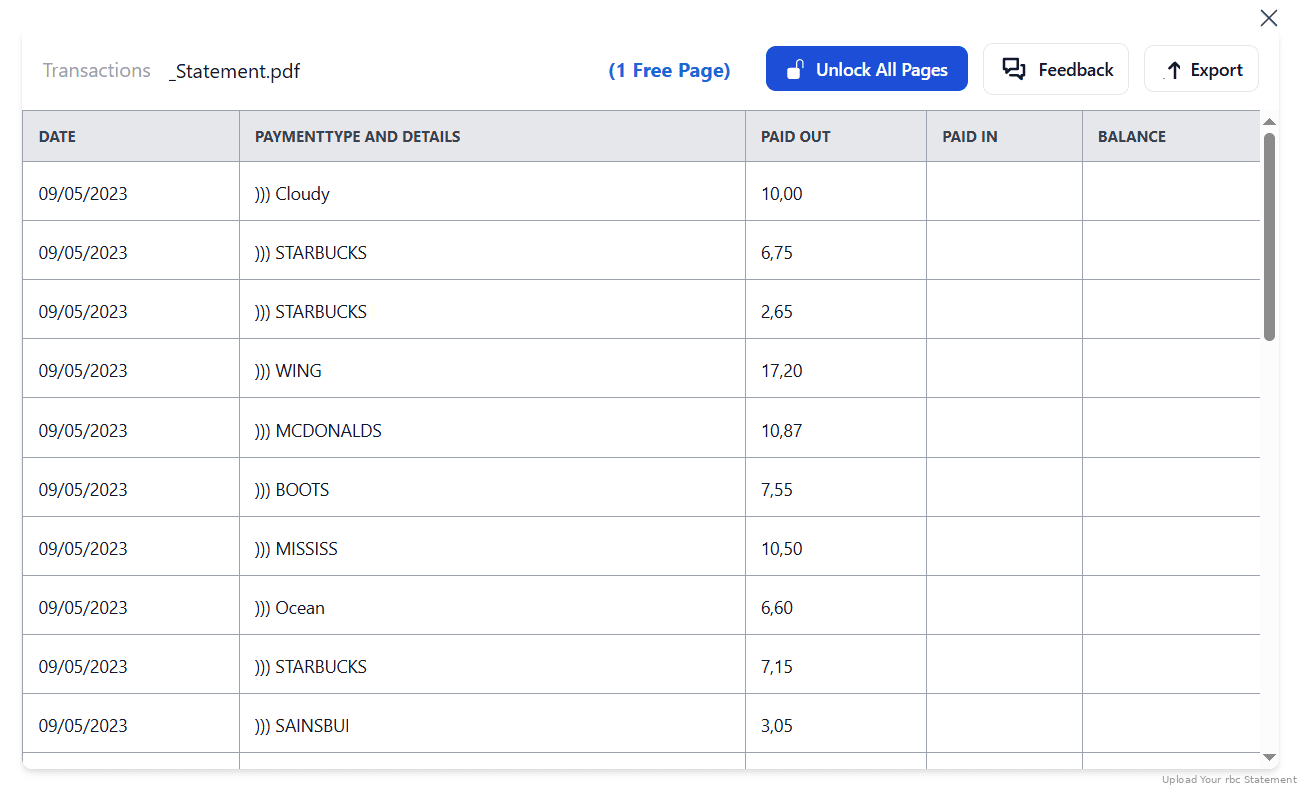
Step 3: Our smart engine converts it to a structured Excel or CSV file.

Step 4: Check result & Download your converted document instantly
Can You Convert RBC Statements Manually?
Technically, yes, but it's rarely worth the effort. Some people try to copy and paste transactions from the PDF into Excel, or open the PDF directly in Excel. In practice, RBC statements use multi-column layouts that break when copied: dates, descriptions, and amounts end up merged into single cells, and you lose the running balance alignment.
Because RBC eStatements are read-only PDFs without embedded cheque images, there's no shortcut such as exporting an attachment, the transaction table is the only structured data, and it has to be extracted. Manual conversion also becomes impractical the moment you have more than one or two of RBC's up-to-seven-years of archived statements, and it introduces data-entry errors right when accuracy matters most (CRA filing, reconciliation, loan applications).
An automated converter reads the statement structure and outputs clean, column-aligned rows in seconds, which is why the four-step method above is the recommended approach for anyone handling multiple statements or a full tax year.
Related Guides
More Canadian Bank Guides:
Frequently Asked Questions
How do I download my RBC bank statement in CSV?
RBC does not currently offer a direct CSV download for full bank statements. You need to download the statement as a PDF from RBC Online Banking (Accounts Summary → Statements/Documents) and use a converter like StatementSheet.
Can I export RBC bank statements to Excel?
No, not directly. You can only download PDF statements from RBC. Use StatementSheet to convert those PDFs into Excel files.
Is it safe to use StatementSheet?
Yes. StatementSheet uses encryption and deletes files automatically after processing. Your financial data stays secure.
Will StatementSheet work with RBC credit cards and business accounts?
Yes. It supports personal accounts, business banking, and credit cards under the RBC system. For business accounts, remember you may first need to switch each account to electronic documents so the statements appear in Online Banking.
Can I use scanned paper statements?
Yes. As long as the scan is clear, StatementSheet can process and convert it to Excel or CSV.
Are eStatements from RBC free to download?
Yes. RBC provides PDF electronic statements (eStatements) free of charge through online and mobile banking.
How far back can I convert RBC statements?
RBC keeps eStatements available in Online Banking for up to 7 years, and StatementSheet can convert any of them once downloaded as PDF. Be aware that some Custom Statements only go back about 18 months, so download older periods before they roll off.
Do RBC eStatements include cheque images?
No. RBC eStatements are read-only PDF versions of your paper statements and do not include cheque images. StatementSheet extracts the transaction table itself, which is what you need for a spreadsheet.
Can I convert multiple RBC statements at once?
Yes. You can convert several monthly statements and combine them in Excel or CSV to build a full-year transaction history, which is ideal for tax season and reconciliation.
Can I convert RBC statements on my phone?
Yes. StatementSheet runs in your browser, so you can download a statement from the RBC Mobile app (More/Menu → Statements) and upload it to convert to Excel or CSV, no software installation required.
Tips for Organizing Your RBC Bank Statements
Once you've converted your RBC PDF statements into Excel or CSV, you're in a great position to better manage your money and stay compliant with Canadian financial expectations. Here’s how to make the most of your converted data:
- Sort by merchant, category, or transaction typeUnderstand your spending habits and track business vs. personal expenses more easily.
- Filter by date range and statement periodUseful when preparing financial reports or submitting tax returns to the CRA.
- Use Excel pivot tables for deeper analysisIdentify trends in your spending or revenue, great for freelancers or business owners.
- Label files by account and statement dateFor example: “RBC-Chequing-April-2025.csv”, ideal for quick reference during audits or tax season.
- Back up converted CSV files to secure cloud storageBecause RBC only archives eStatements for up to 7 years, keeping your own converted copies protects older records for CRA queries, mortgage approvals, or business grants.
Troubleshooting Common RBC Conversion Issues
- Scanned statement won't convert cleanlyMake sure the scan is straight, in focus, and at least 300 DPI. Blurry or skewed scans reduce text-recognition accuracy. Re-scanning at higher quality usually resolves it.
- Statement you need is no longer showingRBC only keeps eStatements for up to 7 years, and some Custom Statements just 18 months. If the period you need has dropped off, RBC's statement support line (1-800-769-2511) can help you locate older documents.
- Business account statements missingFor RBC Business Banking, only accounts you've switched to electronic documents appear in Online Banking. Enable eStatements on the relevant account first, then download and convert.
- Multi-page statementsUpload the full PDF in one go rather than splitting pages, so the converter keeps your running balance and date order intact across pages.
Final Thoughts: Make Your RBC Statements Work for You
Converting RBC bank statements from PDF to Excel or CSV format doesn’t need to be complex. With StatementSheet, you can instantly unlock your transaction data for budgeting, tax prep, and business use, without tedious data entry.
Don’t let rigid PDFs slow you down. Whether you're tracking spending, reporting taxes, or reconciling accounts, converting your RBC download transactions to Excel is just a few clicks away.
Ready to convert your RBC bank statement to Excel or CSV?
➡️ Visit StatementSheet today and simplify your financial workflow.