
How to Convert CIBC Bank Statements to Excel and CSV
A step-by-step guide to export your CIBC bank statements into spreadsheet formats
Managing your personal banking or business banking records in Canada gets confusing because CIBC gives you two different things: a transaction export and an eStatement. They are not the same record, and mixing them up is why month-end reconciliation goes wrong. If you've searched "CIBC download transactions to Excel" or "export CIBC transactions to Excel", the distinction matters more than the format.
In this guide, we explain exactly what CIBC's native export gives you, what it leaves out, and how to convert your CIBC PDF statements into Excel or CSV using StatementSheet, the most efficient solution to convert PDF bank statements into actionable data.
Can You Download CIBC Bank Statements Directly in Excel or CSV?
Short Answer: yes for transactions, no for the statement, and the difference decides your workflow.
CIBC does offer a native export. From the Online Banking home page under "More", select "Download Transactions", choose the account and time period, and pick your format. CSV, QFX and OFX are all available (if you use financial management software, you can select it directly from the drop-down). CIBC's CSV columns are Transaction Date, Description, Withdrawals, Deposits and Balance, with dates in YYYY-MM-DD format. Note there's no dedicated .xlsx download: you open the CSV in Excel.
What the export doesn't give you is the statement. Depending on the account and format, a native export may not preserve the monthly statement boundary, the opening balance, the closing balance, summary sections, or the page-level context showing exactly how the statement was presented. Official monthly eStatements remain PDFs, and CIBC keeps up to 7 years of bank account and credit card eStatements online.
So use the bank's export for recent activity and day-to-day analysis. Convert the PDF when the formal statement is the working record: month-end reconciliation that must match statement balances, accountant-to-client handoffs, archived months, or anything a lender or auditor will inspect. That's where StatementSheet comes in.
Why Convert CIBC PDF Bank Statements to Excel or CSV?
CIBC's transaction export is genuinely useful, but it isn't the eStatement. Here's what converting the PDF adds:
- Keep the opening and closing balancesCIBC's transaction exports don't include the opening and closing balance summary that lenders and auditors expect. Bank reconciliation has to match statement balances, not just a list of transactions.
- Preserve the exact statement periodA transaction feed follows your chosen date range, not the bank's billing cycle. For a credit card month or a formal statement period, the PDF is the only document that carries the correct boundaries.
- Get a real Excel workbookCIBC's native workflow is CSV or QFX, never a dedicated .xlsx statement download. Converting the PDF gives you a formatted Excel workbook rather than a comma-separated dump.
- Prepare for CRA Tax Filing and GST/HSTWhether you're filing personal taxes or managing business records, balance-complete data imports cleanly into QuickBooks Canada, Sage or Wave, and supports input tax credit calculations.
- Rebuild archived months in one passCIBC keeps 7 years of eStatements online. Batch-converting them produces a consolidated workbook covering the full date range, which no single native export can do.
CIBC Download Transactions vs. eStatement: Which Do You Need?
A transaction feed and a CIBC eStatement are not the same record. The export gives you activity rows. The monthly statement gives you the bank-issued document for a specific period.
| Feature | Download Transactions | eStatement PDF (converted) |
|---|---|---|
| Where | Home page, More, Download Transactions | My Accounts, View Statements |
| Formats | CSV, QFX, OFX (no .xlsx) | Excel (.xlsx) or CSV after conversion |
| Opening/closing balances | Not included | Yes |
| Statement period boundary | Your chosen date range | The bank's actual cycle |
| Best for | Recent activity, quick analysis | Reconciliation, audits, lender files |
Rule of thumb: pick CSV for spreadsheet work and QFX for direct software import. When the statement itself is the evidence, convert the PDF to CSV (for accounting) or Excel (for analysis).
Why Use StatementSheet?
When the native export isn't enough, StatementSheet converts your CIBC PDF eStatements into Excel or CSV, fast and accurately.
- ✔️ Captures the opening and closing balances CIBC's transaction export omits
- ✔️ Preserves the exact statement period and billing cycle boundaries
- ✔️ Maps CIBC's Date / Description / Withdrawals / Deposits / Balance columns directly
- ✔️ Produces a true Excel (.xlsx) workbook, which CIBC never offers natively
- ✔️ Batch-converts 7 years of eStatements into one consolidated file
- ✔️ Converts Canadian Dollar (CAD) formats and YYYY-MM-DD dates with precision
- ✔️ Encrypted, PIPEDA-compliant processing, files deleted after conversion
- ✔️ Accurate extraction from CIBC's machine-generated PDFs and from scanned copies
Which CIBC Documents Can You Convert?
StatementSheet works across the full CIBC range, including:
- CIBC chequing and savings account eStatements
- CIBC Visa and Aventura credit card statements
- Business banking statements
- Personal line of credit and investment account eStatements
- Digital PDFs from Online Banking, plus scanned or photographed statements
How to Convert CIBC PDF Bank Statements in Four Easy Steps
Here’s how you can convert your CIBC PDF bank statements
Step 1: Download Your CIBC PDF Bank Statement
- Sign in to CIBC Online Banking
- Select My Accounts, then choose the account (chequing, savings, or credit card)
- Click View Statements (or eStatements) and choose the statement period
- Click Download PDF and save it to your computer (up to 7 years are available)
In the CIBC Mobile Banking app, tap the account, then Statements, select the period and download the PDF. If you only need recent activity rows instead, go to the Online Banking home page, select More, then Download Transactions, choose the account, time period and format (CSV or QFX). The export workflow lives in Online Banking, not the mobile app.
Step 2: Upload your PDF Bank Statement

Step 3: Our smart engine converts it to a structured Excel or CSV file.

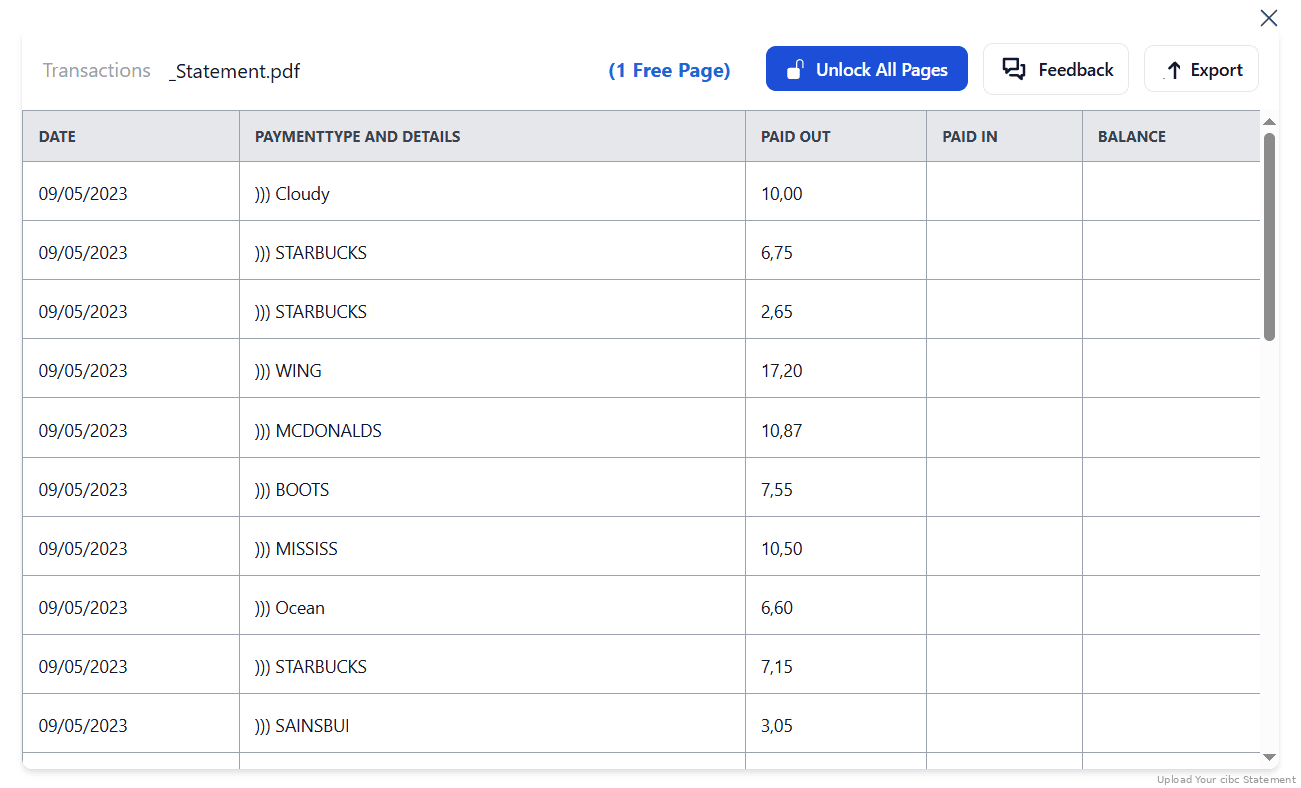
Step 4: Check result & Download your converted document instantly
Can You Convert CIBC Statements Manually?
CIBC issues clean machine-generated PDFs with a standard Canadian layout: Date, Description, Withdrawals, Deposits, Balance. That readability is deceptive. In a columnar statement, a number is a withdrawal, a deposit or a balance purely because of its horizontal position on the page. Copy-paste discards that position, so figures land in the wrong column and your totals drift.
Rebuilding a year compounds it. You're merging twelve documents, each with its own opening and closing balances, and a single dropped row at a page break silently breaks the chain. The whole point of using the eStatement rather than the export is that the balances tie out, so losing them in transit defeats the exercise.
An automated converter understands the tabular structure, keeps withdrawals, deposits and running balances in their correct columns across every page, reconciles the extracted total against CIBC's stated opening and closing balances, and merges months into one workbook. That's why the four-step method above is the reliable route for CRA filings and lender packages.
Related Guides
More Canadian Bank Guides:
Frequently Asked Questions
How do I download my CIBC transactions in CSV?
From the Online Banking home page under "More", select "Download Transactions", choose the account and time period, then pick CSV (QFX and OFX are also offered). The columns are Transaction Date, Description, Withdrawals, Deposits and Balance, with dates in YYYY-MM-DD.
Why doesn't my CIBC export show my opening balance?
Because a transaction export isn't the statement. It won't preserve the monthly statement boundary, opening balance, closing balance or summary sections. When your reconciliation must match statement balances, convert the PDF eStatement instead.
Can I export CIBC transactions directly to Excel?
Not as an .xlsx file. CIBC's native workflow is CSV or QFX, which you then open in Excel. For a properly formatted Excel workbook with balances intact, convert the PDF statement with StatementSheet.
How far back can I get CIBC statements?
CIBC lets you view up to 7 years of bank account and credit card eStatements online, including personal lines of credit and investment accounts. For anything older, contact CIBC directly.
Does StatementSheet support business accounts and credit cards?
Yes, it supports personal and business banking accounts from CIBC, including Visa and Aventura credit card statements and high-volume transaction data.
Can I use scanned statements?
Yes. As long as the scans are clear, StatementSheet's OCR engine can extract and convert them with high accuracy. CIBC's own machine-generated PDFs give the best results.
Does CIBC charge for downloading PDF bank statements?
No. eStatements are free through CIBC Online Banking once you've signed up under Settings, Statement Preferences.
Tips for Organizing Your CIBC Bank Statements
Once you've converted your statements from PDF to Excel or CSV, use these tips to streamline your financial management:
- Reconcile against the stated balancesCompare the sum of your extracted transactions against CIBC's printed opening and closing balances. If they don't tie, a row was dropped at a page break.
- Keep the YYYY-MM-DD date formatCIBC uses ISO-style dates, which sort correctly by default. Resist letting Excel reformat them into a locale-dependent format before you import anywhere.
- Tag each row with its sourceIf your workbook mixes rows from Download Transactions with rows from converted eStatements, label them. Only the statement rows carry the balance context an auditor will check.
- Use Excel Pivot TablesCreate dynamic reports for budgeting, business reconciliation, or GST/HST tracking across the 7-year archive.
- Store in Encrypted Cloud FoldersUse services like Google Drive or Dropbox for backup and accessibility during CRA reviews, and keep copies beyond CIBC's 7-year window.
Troubleshooting Common CIBC Conversion Issues
- Your export is missing the balance summaryThat's expected. Download Transactions gives you activity rows, not the bank-issued statement. Convert the PDF eStatement when opening and closing balances matter.
- You can't find Download Transactions in the appThe export workflow lives in CIBC Online Banking, under More. The mobile app is for viewing activity and downloading statement PDFs, not exporting transaction files.
- Your date range doesn't match the statementAn export follows the dates you picked, not the bank's billing cycle. For a credit card month or a formal statement period, use the eStatement, which carries the correct boundaries.
- Withdrawals appearing in the balance columnIn CIBC's columnar layout, a number's meaning depends on its horizontal position. Copy-paste loses that. Convert the PDF so Withdrawals, Deposits and Balance land where they belong.
Final Thoughts: Take Control of Your Canadian Finances
CIBC does offer exports, in CSV, QFX and OFX. But an export is not a replacement for the eStatement when the statement itself is the evidence. It drops the opening balance, the closing balance, the statement period and the summary sections that reconciliation, audits and lender files all depend on.
With StatementSheet, you can convert CIBC PDF eStatements into balance-complete Excel or CSV files in a few clicks, and batch-convert years of archives into one workbook. Whether you're managing personal banking, company books, or a CRA filing, clean structured data is a huge advantage.
Ready to convert your CIBC bank statement to Excel or CSV?
➡️ Visit StatementSheet and transform your PDFs into actionable spreadsheets today.