
How to Convert GTBank Statements to Excel and CSV
A step-by-step guide to turning your GTBank statements into usable spreadsheet formats, built for Nigeria.
GTBank is unusual among Nigerian banks: its Export Statement button genuinely lets you choose between PDF and Excel. That solves the reconciliation problem, until a lender or an embassy asks for the signed and stamped version, which only exists as a PDF. So you end up needing both.
This guide explains what GTBank actually exports, when the PDF is the only acceptable format, and how StatementSheet turns those PDF statements into clean Excel or CSV files.
Can You Download GTBank Statements Directly in Excel or CSV?
Short answer: yes, GTBank does offer Excel. But the signed and stamped statement that lenders and embassies require is PDF only.
GTBank was among the first Nigerian banks to take digital channels seriously, and it shows here. In internet banking, the Export Statement option lets you choose your preferred format, PDF or Excel. There is also a Printer Friendly Version. The same applies to card statements, which export the same two ways.
The catch is what each format is good for. The signed and stamped statement, the one lenders, embassies and visa applications demand, is a PDF. Excel is fine for your own reconciliation, but it carries no bank authentication, so it will not be accepted where an official document is required.
In practice most GTBank customers end up holding PDFs: the stamped copy they requested for an application, or statements received by email. GTBank even runs an email channel for this, where you write to the bank in a set format specifying your date range and account number. Converting those PDFs gives you the spreadsheet side without giving up the official document.
Why Convert GTBank PDF Statements to Excel or CSV?
GTBank does offer Excel, but PDFs still pile up. Converting closes the gap:
- Turn stamped PDFs into usable dataThe signed and stamped statement only exists as a PDF, because it carries the bank's authentication. Converting it lets you reconcile from the same document you submitted to a lender.
- Work with statements received by emailWhen the export option is unavailable, GTBank lets you request statements by email in a set format. What comes back is a PDF, which conversion turns into a spreadsheet.
- Get a properly formatted workbookThe native Excel export is a plain extract rather than a formatted workbook. Converting the PDF produces typed columns ready for pivot tables and filtering.
- Reconcile card and account statements togetherGTBank issues separate statements for cards and accounts. Converting both into the same column structure lets you see spending and banking side by side.
- Keep records for FIRS and your accountantClean transaction data makes tax preparation with the Federal Inland Revenue Service far simpler, and lets your accountant work from figures rather than screenshots.
Excel Export vs. Stamped PDF: Which Should You Use?
GTBank offers both, and they answer different questions.
| Critère | Excel export | Signed and stamped PDF (converted) |
|---|---|---|
| Accepted by lenders and embassies | No, carries no bank authentication | Yes, that is its purpose |
| Ready to reconcile | Yes, but as a plain extract | Yes, after conversion |
| Formatted workbook | No | Yes, after conversion |
| Available by email request | No | Yes, through the bank's email channel |
| Best for | Quick internal checks | Applications, audits, formal records |
Simple rule: Use the Excel export for a quick look at recent activity. For anything official, request the stamped PDF and convert it when you need the numbers.
Why Use StatementSheet?
StatementSheet reads your GTBank PDF statement and turns every transaction line into a structured spreadsheet row, with no copying, pasting or manual cleanup.
- ✔️ Converts signed and stamped PDFs that Excel export cannot replace
- ✔️ Handles statements received through GTBank's email request channel
- ✔️ Produces a formatted .xlsx workbook rather than a plain extract
- ✔️ Covers both account statements and card statements
- ✔️ Naira amounts returned as numbers you can calculate with
- ✔️ Ready for Sage, QuickBooks and Excel
- ✔️ Scanned statements handled by OCR, with files processed securely
Which GTBank Documents Can You Convert?
GTBank serves retail, SME and corporate customers across Nigeria and West Africa. StatementSheet handles:
- GTBank savings and current account statements in PDF
- GTBank signed and stamped statements for loan and visa applications
- GTBank card statements exported from internet banking
- GTBank domiciliary account statements
- Statements received through the email request channel, plus scanned copies
How to Convert GTBank PDF Statements in Four Easy Steps
Here is how to turn your GTBank PDF statements into Excel or CSV:
Step 1: Download Your GTBank Statement
- Log in to GTBank Internet Banking or the GTWorld app
- Open your account or card statement and set the period you need
- Click Export Statement and choose your preferred format
- For applications, select the signed and stamped PDF option and save the file
If the export options are not available to you, GTBank accepts statement requests by email. Write to the bank's assistant address using the expected format, specifying the period and your account number, for example: send my statement from May 1st 2025 to July 31st 2025 for your account number.
Step 2: Upload Your PDF Bank Statement

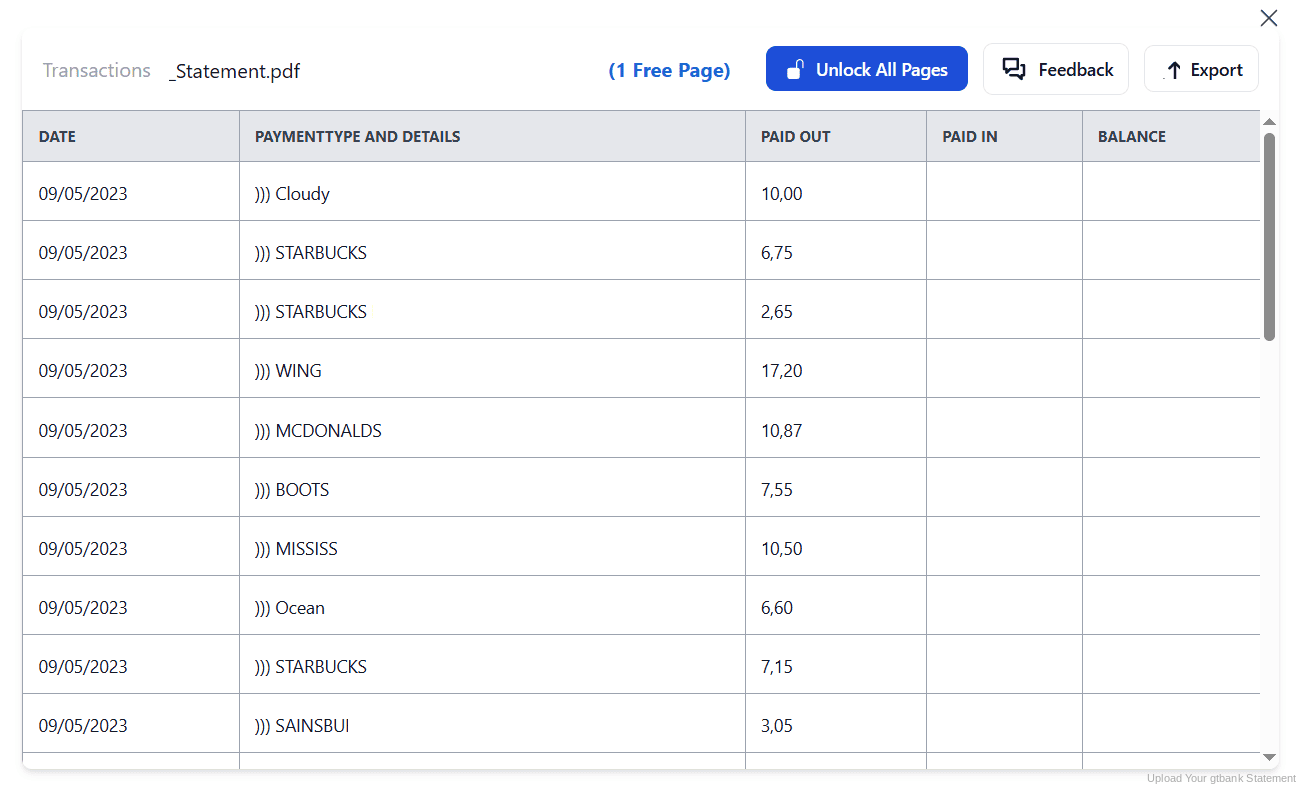
Step 3: Our engine converts it into a structured Excel or CSV file

Step 4: Check the result and download your converted file instantly
Can You Convert GTBank Statements Manually?
You might assume the Excel export removes the need, but it does not. The version lenders accept is the stamped PDF, and that is the document you will most often hold. Copying from it by hand brings the familiar problems: columns drifting at page breaks and narrations wrapping onto a second line.
The native Excel export has its own limits. It is a plain extract rather than a formatted workbook, so columns still need typing and cleaning before anything totals correctly. And because card and account statements come separately, each has to be handled and aligned on its own.
An automatic converter reads the statement, merges wrapped narrations and rebuilds Date, Description, Debit, Credit and Balance as real columns. Check your totals against the closing balance afterwards to confirm the result.
Related Guides
More Nigeria Bank Guides:
Frequently Asked Questions
Does GTBank let me export statements to Excel?
Yes. In internet banking, click Export Statement and choose your preferred format, PDF or Excel. There is also a Printer Friendly Version. The same options apply to card statements.
What is a signed and stamped GTBank statement?
It is the authenticated PDF version of your statement, carrying the bank's signature and stamp. Lenders, embassies and visa applications generally require it, and the Excel export cannot substitute for it.
How do I request a GTBank statement by email?
If the export options are not available, GTBank accepts requests at its assistant email address, using a set format specifying the period and your account number, such as: send my statement from May 1st 2025 to July 31st 2025 for your account number.
Why convert if GTBank already gives me Excel?
The Excel export is a plain extract, and the stamped PDF is the document you actually hold for applications. Converting gives you a properly formatted workbook from the authenticated document.
How do I log in to GTWorld?
Download the GTWorld app, then enter the six-digit one-time password sent to your registered mobile number, which is valid for one hour. Login credentials are sent to your registered email address, and the default password expires after twenty-four hours.
Can I convert my GTBank card statement too?
Yes. Card statements export the same way through Export Statement, and both card and account statements convert into the same column structure so you can compare them.
Tips for Organizing Your Converted GTBank Statements
Once your statements are converted to Excel or CSV, here is how to get the most out of them:
- Keep the stamped PDF, work from the conversionThe stamped PDF is what a lender or embassy accepts, so never discard it. Convert a copy for your own reconciliation and leave the original untouched.
- Use the email channel when export failsIf the export option is missing, GTBank's email request works, but only in the expected format. State the period and your account number exactly as the bank asks, or the request may not be processed.
- Use your default password within 24 hoursWhen setting up GTWorld, the default password sent to your registered email expires after twenty-four hours. Complete the setup promptly or you will need to start again.
- Reconcile card and account side by sideConvert both your card and account statements, then merge them by date. Spending patterns that look odd on one become clear when you see both together.
- Keep records for six yearsNigerian tax rules require business records to be kept for six years. Keep the original PDF: in a review it is the source document that counts, not your spreadsheet.
Troubleshooting Common GTBank Conversion Issues
- Your lender rejected the Excel fileExcel exports carry no bank authentication. Request the signed and stamped PDF instead, and convert a copy of it if you also need the numbers in a spreadsheet.
- The export option is missingGTBank provides an email channel for statement requests. Write using the expected format, stating the period and your account number, and the statement will be sent to you.
- Your GTWorld default password stopped workingThe default password sent to your registered email is only valid for twenty-four hours. Request a new one and complete the setup within that window.
- Naira amounts are not adding upPasting from a PDF usually turns amounts into text. A clean conversion returns them as numbers you can calculate with straight away.
Final Thoughts: Take Control of Your Financial Data
GTBank goes further than most Nigerian banks by offering an Excel export at all. But the statement that carries weight, the signed and stamped one, is a PDF, and the Excel extract is not a formatted workbook.
With StatementSheet, your GTBank PDF statements become clean Excel or CSV files: separate columns, merged narrations, naira amounts that calculate properly, without giving up the authenticated document your lender needs.
Ready to convert your GTBank statement to Excel or CSV?
➡️ Ready to convert bank statement PDF to CSV? without giving up the stamped copy your lender needs.