
How to Convert ABN AMRO Bank Statements to Excel and CSV
A step-by-step guide to turning your ABN AMRO statements into usable spreadsheet formats, built for the Netherlands.
ABN AMRO keeps your bank statements for twenty years. It keeps your transactions for eighteen months. Those are two different archives with two different download screens, and only the shorter one gives you machine-readable files. Anything older than eighteen months exists solely as a PDF.
That gap is the whole problem for anyone facing the Dutch seven year bewaarplicht. This guide explains how the two archives differ and how StatementSheet turns your ABN AMRO PDF statements into clean Excel or CSV files.
Can You Download ABN AMRO Bank Statements Directly in Excel or CSV?
Short answer: yes for the last eighteen months, no for anything older. ABN AMRO runs two separate archives and only one of them exports data.
The distinction matters. In Internet Banking you choose between bank statements and summaries, which go back twenty years but download as PDF only, and transaction statements, which offer pdf, txt, mt940, xls and camt.053 but reach back just eighteen months. The rich format list belongs to the short archive.
So the moment your accountant asks for 2021, the export buttons stop being relevant. The document still exists as a PDF in the twenty year archive, but there is no XLS version of it and there never was: ABN AMRO only generates those formats for the rolling eighteen month window.
One more trap before you blame the bank for missing rows. ABN AMRO confirms that transactions do not appear if you pick a Saturday or Sunday as your end date, and advises choosing the next business day instead. People lose weekend payments this way and assume the export is broken.
Why Convert ABN AMRO PDF Statements to Excel or CSV?
The export covers the wrong period for most Dutch accounting work. Converting closes the gap:
- Reach the nineteenth month and beyondTransaction exports stop at eighteen months, while bank statements continue for twenty years as PDF. Converting those PDFs is the only way to get older years into a spreadsheet.
- Cover the full bewaarplicht periodDutch businesses must keep their administration for seven years, and ten for records tied to onroerende zaken. ABN AMRO's machine-readable window covers barely a fifth of that, so the rest arrives as PDF.
- Work with the document that carries your addressThe rekeningafschrift includes your address, which is what third parties ask to see. Converting it keeps that official document as your source while giving you usable columns.
- Avoid the MT940 and CAMT.053 detourMT940 splits each transaction across several lines and CAMT.053 is dense XML. Both are built for software, not reading. A converted statement gives one row per transaction.
- Rebuild a Box 3 position from old statementsPrivate individuals often need the balance on 1 January of a past year for Box 3. That year sits outside the eighteen month window, leaving the PDF as the only record.
Transaction Export vs. Rekeningafschrift: Which Should You Use?
ABN AMRO's two archives look similar in the menu and behave nothing alike.
| Criterion | Transaction export | Rekeningafschrift PDF (converted) |
|---|---|---|
| History available | Eighteen months | Up to twenty years |
| Formats offered | pdf, txt, mt940, xls, camt.053 | PDF only, spreadsheet after conversion |
| Your address included | Not on the web version | Yes |
| Weekend end date issue | Yes, rows can be missing | No, the period is fixed by the bank |
| Best for | Recent bookkeeping, recent reconciliation | Bewaarplicht, older years, proof to third parties |
Simple rule: Inside eighteen months, export directly and mind your end date. Outside it, the rekeningafschrift is your only source, and converting it is what puts it in a spreadsheet.
Why Use StatementSheet?
StatementSheet reads your ABN AMRO rekeningafschrift PDF and turns every transaction line into a structured spreadsheet row, with no copying, pasting or manual cleanup.
- ✔️ Unlocks statements older than the eighteen month export window
- ✔️ Works on the twenty year archive that only exists as PDF
- ✔️ Avoids the MT940 multi-line layout and CAMT.053 XML entirely
- ✔️ Reads Dutch column labels such as Datum, Omschrijving, Af, Bij and Saldo
- ✔️ Handles euro comma decimals so amounts calculate correctly
- ✔️ Ready for Exact, Twinfield, e-Boekhouden, Yuki and Excel
- ✔️ Scanned statements handled by OCR, with files processed securely
Which ABN AMRO Documents Can You Convert?
ABN AMRO serves personal, business and private banking clients across the Netherlands. StatementSheet handles:
- ABN AMRO rekeningafschriften in PDF, personal and business
- Statements from the twenty year archive, including scanned older years
- Jaaroverzicht annual summaries used for tax declarations
- Credit card and Business Card statements
- Savings and Foreign Currency Account statements
How to Convert ABN AMRO PDF Statements in Four Easy Steps
Here is how to turn your ABN AMRO PDF statements into Excel or CSV:
Step 1: Download Your ABN AMRO Rekeningafschrift
- Log in to ABN AMRO Internet Banking or open the ABN AMRO app
- Go to the download overviews screen, or in the app to Profiel, Rekeningen en betalen, then Bankafschriften en jaaroverzicht
- Select the account holder, the statement type and the account, then choose your period
- Tick the statement you want, click Download and save the PDF
Bank statements reach back twenty years, so this is where older years live. If you are exporting recent transactions instead, remember that a Saturday or Sunday end date silently drops that weekend's rows.
Step 2: Upload Your PDF Bank Statement
Step 3: Our engine converts it into a structured Excel or CSV file

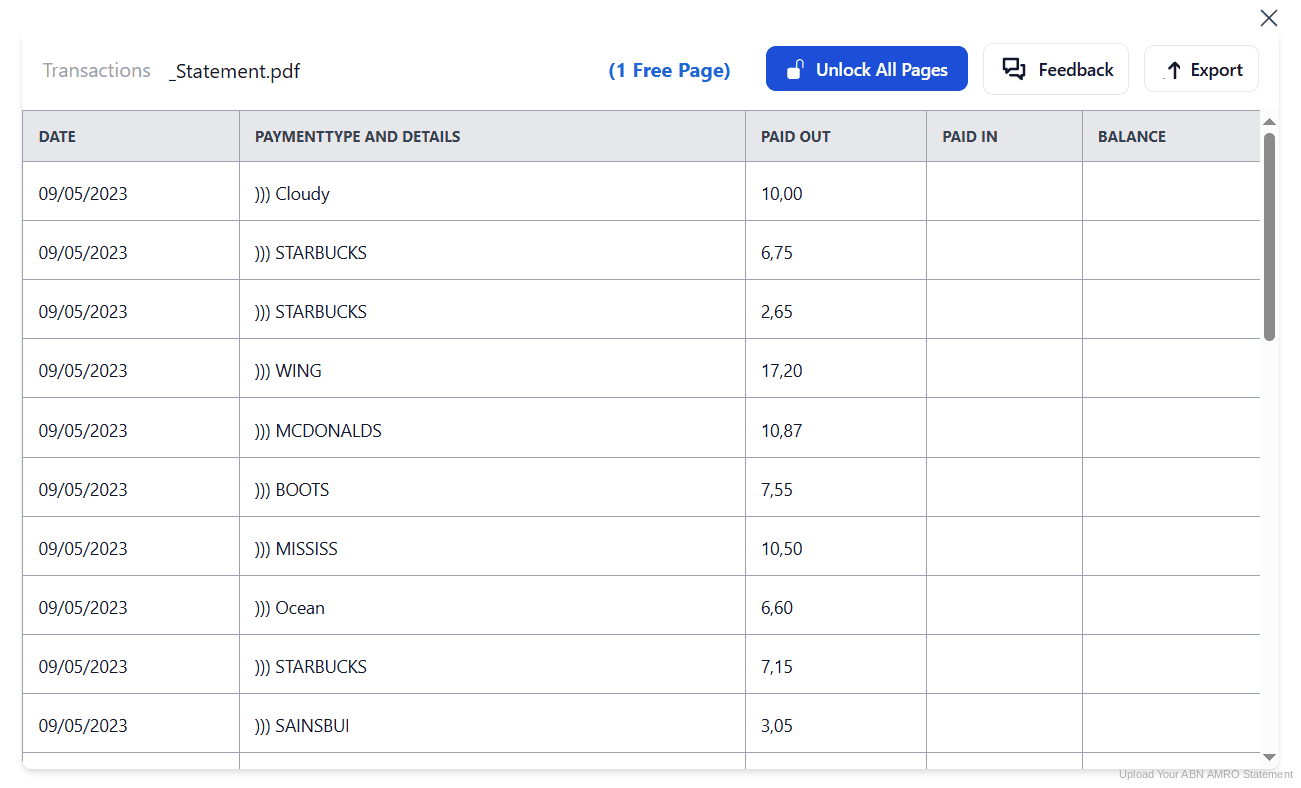
Step 4: Check the result and download your converted file instantly
Can You Convert ABN AMRO Statements Manually?
You can, and for recent months the bank almost does it for you. Outside eighteen months, though, there is no file to reuse: the rekeningafschrift is a PDF and copying it by hand is the default fallback. People also try converting MT940 or CAMT.053 by hand, which is worse, since MT940 spreads a single transaction across several lines and CAMT.053 is XML built for software.
Copying from the PDF brings the usual damage, plus Dutch conventions. Columns are labelled Datum, Omschrijving, Af, Bij and Saldo, and euro amounts use a comma decimal, so figures paste in as text. Long descriptions with counterparty names and payment references wrap onto extra lines, and columns drift at every page break.
An automatic converter reads the rekeningafschrift, maps the Dutch labels to clear headers, normalises euro decimals and rebuilds the transaction table properly. Check your totals against the closing balance afterwards to confirm the result.
Related Guides
More European Bank Guides:
Frequently Asked Questions
How far back do ABN AMRO statements go?
Bank statements and summaries are available for up to twenty years, but only as PDF. Transactions, which come in pdf, txt, mt940, xls and camt.053, only reach back eighteen months.
Why are some transactions missing from my statement?
ABN AMRO explains that transactions do not appear when you choose a Saturday or Sunday as the end date. Payments made that weekend are left out, so select the next business day instead.
Can I get an XLS file for a year older than eighteen months?
No. The xls option belongs to the transaction archive, which is limited to eighteen months. Older years exist only as rekeningafschrift PDFs, so converting them is the way to get a spreadsheet.
What is the difference between a bank statement and a transaction statement?
The rekeningafschrift is the official document, includes your address and is kept for twenty years. The transaction statement is a data extract over a period you choose, limited to eighteen months.
How long do I have to keep ABN AMRO statements in the Netherlands?
Businesses and zzp'ers must keep their administration for seven years, and ten years for records relating to onroerende zaken. Private individuals have no legal duty, but five years is prudent because the Belastingdienst can issue an assessment that far back.
Does downloading ABN AMRO statements cost anything?
No. Downloading statements through Internet Banking or the ABN AMRO app is free, whether you take the PDF statement or a transaction export.
Tips for Organizing Your Converted ABN AMRO Statements
Once your statements are converted to Excel or CSV, here is how to get the most out of them:
- Export before the eighteenth month closesThe transaction window rolls forward continuously. Take an export every quarter and the machine-readable version is already saved before it drops out of reach.
- Never end a period on a weekendA Saturday or Sunday end date drops that weekend's transactions. Always run to the next business day, then check the closing balance matches.
- Keep the PDF alongside the spreadsheetDutch rules require records in their original form. Keep the rekeningafschrift PDF for the bewaarplicht and treat the converted file as your working copy.
- Name files by year, not by download dateABN AMRO builds filenames from the download timestamp, not the period covered, so exports tell you when you clicked rather than what is inside. Rename them to the statement period.
- Plan for seven years, ten with propertyThe bewaarplicht runs seven years for most records and ten where onroerende zaken are involved. Build your folder structure around the longer term from the start.
Troubleshooting Common ABN AMRO Conversion Issues
- The xls option is missing for the period you needYou are in the twenty year statement archive, which only offers PDF. Download the rekeningafschrift and convert it rather than hunting for an export button that does not exist there.
- A weekend of transactions is missingYour end date fell on a Saturday or Sunday. Rerun the download with the next business day as the end date and the rows reappear.
- Your accounting software rejects the MT940 fileMT940 is strict about structure and unforgiving once edited. Convert the PDF statement instead and import a clean spreadsheet.
- The TXT export has no column headers at allABN AMRO's txt download is tab separated and ships without a header row, so columns must be identified by position. Its column order also differs from the xls file, so a mapping built for one breaks on the other.
- Credit card statements behave differentlyABN AMRO credit cards are issued by ICS and their statements are separate documents. The Professional card cannot be supplied as CSV, so the PDF is the only route into a spreadsheet.
Final Thoughts: Take Control of Your Financial Data
ABN AMRO gives you twenty years of statements and eighteen months of data. For anything inside that window the export works well, as long as you avoid a weekend end date. For everything older, and that is most of what the bewaarplicht covers, the PDF is the record.
With StatementSheet, your ABN AMRO rekeningafschrift PDFs become clean Excel or CSV files: Dutch labels mapped to clear headers, euro decimals handled properly, older years reopened, ready for Exact, Twinfield, e-Boekhouden or your accountant.
Ready to convert your ABN AMRO bank statement to Excel or CSV?
➡️ Ready to convert bank statement PDF to Excel? with no eighteen month ceiling to work around.