
How to Convert Public Bank Statements to Excel and CSV
A step-by-step guide to turning your Public Bank statements into usable spreadsheet formats, built for Malaysia.
Public Bank runs two front doors to the same accounts: PBe, the long-standing internet banking service, and MyPB, the newer platform you reach with the very same credentials. Statements sit behind both. What neither offers is a way to get those statements into a spreadsheet.
This guide explains what Public Bank actually provides, how PBe and MyPB relate to each other, and how StatementSheet turns your Public Bank PDF statements into clean Excel or CSV files.
Can You Download Public Bank Statements Directly in Excel or CSV?
Short answer: no. Public Bank offers the e-Statement free of charge, but as a PDF. There is no CSV or Excel export in PBe or MyPB.
Public Bank, founded in 1966 and the largest Malaysian bank by shareholders' funds, delivers statements through its e-Statement service, which the bank describes as safer, free and more environmentally friendly than paper. You download your account statement online, and what arrives is a PDF.
Where you download it from depends on which platform you use. PBe is the established internet banking service, while MyPB is the newer one-stop screen showing balances, recent transactions and statements together. The useful part is that MyPB uses your existing PBe user ID and password, so there is nothing new to register. The confusing part is that customers often look for statements in one place when they are used to the other.
Neither platform offers CSV, Excel, QIF or OFX. The e-Statement is a document to read and keep, not data to reconcile. One more quirk worth knowing: registering for PBe in the first place requires visiting a branch to collect a temporary ID and password, which is unusual friction for an online service. Once you have the PDF, converting it is the direct route to a spreadsheet.
Why Convert Public Bank PDF Statements to Excel or CSV?
The e-Statement is free and easy to download, but it stops at being a document:
- Get the CSV that PBe and MyPB do not offerNeither PBe nor MyPB provides a CSV, Excel, QIF or OFX export. The e-Statement is a PDF. Conversion produces exactly the file the bank does not give you.
- Turn a year of statements into one spreadsheetStatements download one month at a time. Converting them all and sorting by date gives you a continuous financial year in a single sheet, which no download screen can show you.
- Use one workflow across PBe and MyPBWhether you download from PBe or from MyPB, the statement is the same PDF. Converting it means your process does not change when you switch platforms.
- Reconcile group and regional accountsThe Public Bank group spans Public Islamic Bank and operations in Cambodia, Laos, Vietnam and Hong Kong. Converting each statement into the same column structure lets you consolidate them properly.
- Prepare for LHDN and your accountantA converted spreadsheet imports into AutoCount, SQL Accounting or Xero without manual retyping, which matters when you are preparing accounts or answering the Inland Revenue Board.
e-Statement PDF vs. Converted File: What Changes?
Public Bank gives you one format, free of charge. Here is what conversion adds to it.
| Critère | Public Bank e-Statement (PDF) | Converted file (Excel / CSV) |
|---|---|---|
| Available from the bank | Yes, free in PBe and MyPB | Produced by converting that PDF |
| Sortable and filterable | No | Yes |
| Whole year in one view | No, one month per download | Yes, once merged |
| Imports into accounting software | No | Yes, as separate columns |
| Best for | Reading and record keeping | Reconciliation, audits, LHDN filing |
Simple rule: For reading a month or proving a transaction, the e-Statement is the document. For a full year you can total and import, convert it.
Why Use StatementSheet?
StatementSheet reads your Public Bank PDF statement and turns every transaction line into a structured spreadsheet row, with no copying, pasting or manual cleanup.
- ✔️ Produces the CSV and .xlsx workbook that PBe and MyPB do not offer
- ✔️ Merges twelve monthly e-Statements into one continuous spreadsheet
- ✔️ Works the same whether you downloaded from PBe or MyPB
- ✔️ Columns for Date, Description, Debit, Credit and Balance, with wrapped descriptions merged
- ✔️ Ringgit amounts returned as numbers you can calculate with
- ✔️ Ready for AutoCount, SQL Accounting, Xero and Excel
- ✔️ Scanned statements handled by OCR, with files processed securely
Which Public Bank Documents Can You Convert?
Public Bank serves personal, business and Islamic banking customers across Malaysia and the region. StatementSheet handles:
- Public Bank savings and current account e-Statements in PDF
- Public Bank credit card and debit card statements
- Public Islamic Bank account statements
- Public Bank business account statements
- Regional statements from Cambodia, Laos, Vietnam and Hong Kong, plus scanned copies
How to Convert Public Bank PDF Statements in Four Easy Steps
Here is how to turn your Public Bank PDF statements into Excel or CSV:
Step 1: Download Your Public Bank e-Statement
- Log in to PBe, or open MyPB with the same user ID and password
- Open the e-Statement section and select the account you need
- Choose the statement month you want to download
- Save the PDF to your computer, and repeat for each month you need
MyPB does not need separate credentials: it uses your existing PBe user ID and password, and is available around the clock. If you have never registered for PBe, note that you first need to visit a branch to collect a temporary ID and password.
Step 2: Upload Your PDF Bank Statement

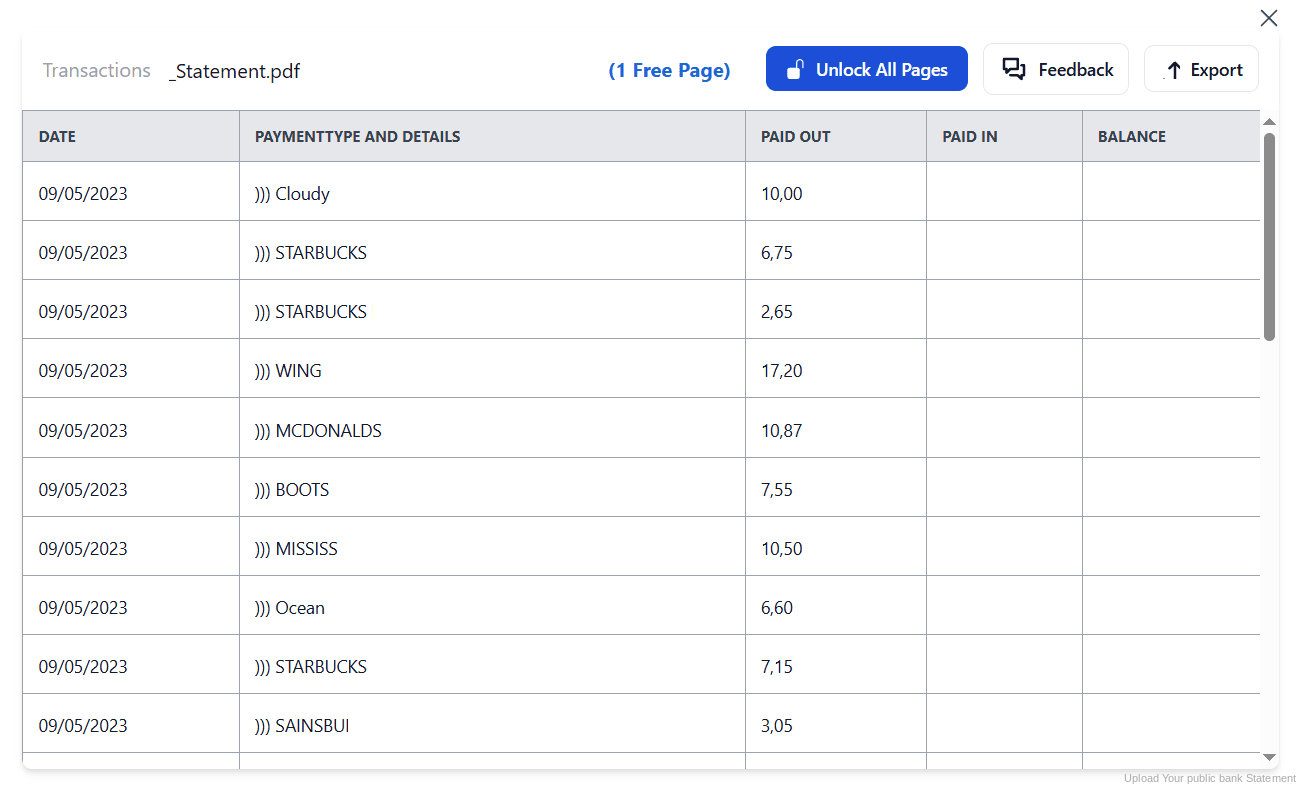
Step 3: Our engine converts it into a structured Excel or CSV file

Step 4: Check the result and download your converted file instantly
Can You Convert Public Bank Statements Manually?
With no export in PBe or MyPB, copying by hand is the only alternative. Statements arrive one month at a time, so a full financial year means twelve documents to open and retype, each with the usual difficulties: columns drifting at page breaks and descriptions wrapping onto a second line.
Ringgit amounts pasted from a PDF tend to arrive as text rather than numbers, so totals silently fail. And if you also hold Public Islamic Bank or regional accounts, each layout needs separate handling before anything can be consolidated.
An automatic converter reads each statement, merges wrapped descriptions and rebuilds Date, Description, Debit, Credit and Balance as real columns, across as many months as you need. Check your totals against the closing balance afterwards to confirm the result.
Related Guides
More Malaysia Bank Guides:
Frequently Asked Questions
Can I export Public Bank transactions to CSV or Excel?
No. Public Bank provides the e-Statement as a PDF through PBe and MyPB, with no CSV, Excel, QIF or OFX option. To get a spreadsheet, download the PDF and convert it with StatementSheet.
What is the difference between PBe and MyPB?
PBe is Public Bank's established internet banking service. MyPB is the newer platform offering a one-stop screen with balances, recent transactions and statements. You log in to MyPB with your existing PBe user ID and password.
Do I need new login details for MyPB?
No. Anyone with access to PBe can use MyPB with the same user ID and password, through the same login link. There is nothing extra to register.
Is the Public Bank e-Statement free?
Yes. Public Bank offers the e-Statement free of charge, presenting it as safer and more environmentally friendly than paper statements. It is delivered as a PDF.
How do I register for PBe?
You need to visit a Public Bank branch to obtain a temporary ID and password, then use those to complete your PBe registration online.
Does this work with Public Islamic Bank statements?
Yes. Statements from Public Islamic Bank and from the group's regional operations convert the same way, and the output keeps a consistent column structure.
Tips for Organizing Your Converted Public Bank Statements
Once your statements are converted to Excel or CSV, here is how to get the most out of them:
- Download every month as it is issuedStatements come one month at a time. Download and convert each as it appears rather than facing twelve at once when your accounts are due.
- Use MyPB for a quicker overviewMyPB puts balances, recent transactions and statements on a single screen, using your existing PBe credentials. It is often the faster route to the file you need.
- Reconcile against the closing balanceCompare your converted totals with the opening and closing balances printed on the statement. If they disagree, a row is missing or duplicated.
- Label conventional and Islamic accounts separatelyIf you hold both conventional and Islamic accounts, name each converted file clearly before merging, so profit-sharing entries are never mixed with interest lines.
- Keep records for seven yearsMalaysian tax rules require business records to be kept for seven years. Keep the original PDF: in an audit it is the source document that counts, not your spreadsheet.
Troubleshooting Common Public Bank Conversion Issues
- You cannot find an export optionThere is not one. Public Bank provides the e-Statement as a PDF in both PBe and MyPB. Download it and convert it to get a spreadsheet.
- You cannot log in to MyPBMyPB uses your existing PBe user ID and password through the same login link. If those do not work, reset them in PBe rather than trying to register separately for MyPB.
- You have no PBe access at allPBe registration starts at a branch, where you collect a temporary ID and password. Until then, statements can only be obtained through the branch itself.
- Ringgit amounts are not adding upPasting from a PDF usually turns amounts into text. A clean conversion returns them as numbers you can calculate with straight away.
Final Thoughts: Take Control of Your Financial Data
Public Bank offers the e-Statement free through both PBe and MyPB, which is convenient. But it is a PDF, downloaded one month at a time, with no CSV or Excel option on either platform.
With StatementSheet, your Public Bank PDF statements become clean Excel or CSV files: separate columns, merged descriptions, ringgit amounts that calculate properly, ready for your accountant or your LHDN filing.
Ready to convert your Public Bank statement to Excel or CSV?
➡️ Ready to convert bank statement PDF to CSV? and merge twelve monthly statements into one sheet.