
How to Convert Intesa Sanpaolo Bank Statements to Excel and CSV
A step-by-step guide to turning your Intesa Sanpaolo statements into usable spreadsheet formats, built for Italy.
Intesa Sanpaolo's export has a peculiar distinction: Italian accounting software treats it as its own category. Import screens list Intesa Sanpaolo XLSX alongside generic CSV and CBI options, because the file behaves differently enough to need its own handler. And sometimes it still needs converting back to the older XLS format before it will load.
This guide explains where Intesa files its statements, what the XLSX export really involves, and how StatementSheet turns your Intesa PDF statements into clean Excel or CSV files.
Can You Download Intesa Sanpaolo Statements Directly in Excel or CSV?
Short answer: yes, Intesa exports XLSX. But it is distinctive enough that accounting software handles it as a separate format.
Intesa Sanpaolo files statements in an area called ARCHIVIO, reachable from the website or the app. Inside, the DOCUMENTI section holds a long list where you select estratto conto as the document type. Alternatively, Ricerca Avanzata lets you filter by rapporto, document type and reference period, which is faster once the archive fills up.
Worth knowing: the archive is not only for statements. It also holds transaction receipts for operations carried out online, institutional communications, summary documents and securities account reports. The estratto conto sits among all of those, which is why selecting the document type matters rather than scrolling.
The export itself is unusual. Intesa's XLSX format is specific enough that Italian accounting packages list Intesa Sanpaolo XLSX as its own import option, separate from generic Excel or CSV. And the documentation notes a further step: files in XLSX format sometimes need converting to XLS before the import will accept them. Converting the PDF statement avoids that chain entirely.
Why Convert Intesa Sanpaolo PDF Statements to Excel or CSV?
The XLSX export works, once your software knows what to do with it. Converting is simpler:
- Avoid the XLSX to XLS conversionItalian accounting software sometimes requires Intesa's XLSX to be converted back to the older XLS format before import. A converted statement arrives in a format your software already accepts.
- Skip the format-specific handlingAccounting packages list Intesa Sanpaolo XLSX as its own import type because the file needs special treatment. Converting the PDF produces a standard spreadsheet with no special handling required.
- Find statements among everything elseARCHIVIO holds receipts, institutional communications, summary documents and securities reports alongside statements. Converting the ones you actually need keeps your accounting data separate from the noise.
- Make numeric causali usableIntesa identifies transaction types with numeric codes rather than descriptions, some following the CBI standard. Converted into clean columns, those codes stay aligned with the right entries.
- Handle single or split amount columnsItalian bank files differ: some split incoming and outgoing into two columns, others use one column with a minus sign. A proper conversion normalises this so your software reads the signs correctly.
XLSX Export vs. Estratto Conto PDF: Which Should You Use?
Intesa offers both, and the effort involved differs more than you would expect.
| Critère | Intesa XLSX export | Estratto conto PDF (converted) |
|---|---|---|
| Accepted as-is by accounting software | Often needs its own import handler | Yes, a standard spreadsheet |
| Further conversion needed | Sometimes XLSX to XLS | None |
| Official document | No, a data extract | Yes, the estratto conto is the record |
| Where it lives | Exported from the movements view | Filed in ARCHIVIO under DOCUMENTI |
| Best for | Routine imports on configured software | Tax filing, audits, formal records |
Simple rule: If your accounting software has the Intesa Sanpaolo XLSX option configured, use it. Otherwise convert the estratto conto and skip the format problem.
Why Use StatementSheet?
StatementSheet reads your Intesa Sanpaolo estratto conto PDF and turns every transaction line into a structured spreadsheet row, with no copying, pasting or manual cleanup.
- ✔️ Produces a standard spreadsheet, with no XLSX to XLS step
- ✔️ Works from the estratto conto filed in ARCHIVIO, the official record
- ✔️ Keeps numeric causali aligned with the transactions they describe
- ✔️ Normalises incoming and outgoing amounts whether split or signed
- ✔️ Euro amounts with comma decimals returned as calculable numbers
- ✔️ Ready for TeamSystem, Zucchetti, Fatture in Cloud and Excel
- ✔️ Scanned statements handled by OCR, with files processed securely
Which Intesa Sanpaolo Documents Can You Convert?
Intesa Sanpaolo serves personal and business customers throughout Italy. StatementSheet handles:
- Intesa Sanpaolo estratto conto statements in PDF
- Conto Business statements filed in ARCHIVIO
- Contabili, the receipts for operations carried out online
- Documenti di sintesi and securities account reports
- Card statements and scanned paper statements
How to Convert Intesa Sanpaolo PDF Statements in Four Easy Steps
Here is how to turn your Intesa Sanpaolo PDF statements into Excel or CSV:
Step 1: Download Your Intesa Sanpaolo Estratto Conto
- Log in at intesasanpaolo.com or open the Intesa Sanpaolo Mobile app
- Click ARCHIVIO, then open the DOCUMENTI section
- Scroll the list and select estratto conto as the document type, or use Ricerca Avanzata to filter by rapporto, document type and period
- Click the document to open it, then download the PDF
ARCHIVIO also holds receipts for online operations, institutional communications, summary documents and securities account reports, so selecting the document type is quicker than scrolling. Ricerca Avanzata is the better route once you have several years of documents filed.
Step 2: Upload Your PDF Bank Statement

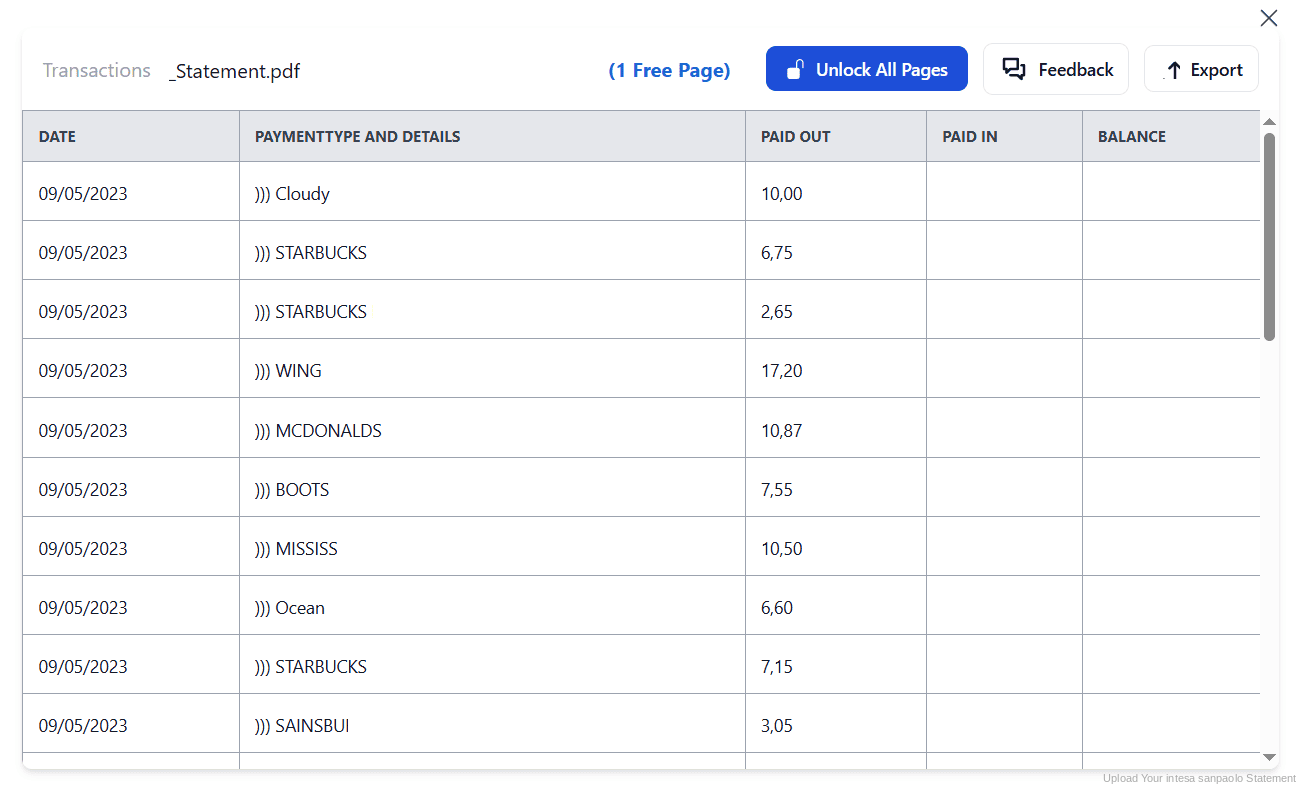
Step 3: Our engine converts it into a structured Excel or CSV file

Step 4: Check the result and download your converted file instantly
Can You Convert Intesa Sanpaolo Statements Manually?
Intesa's XLSX export sounds like the answer until you try to import it. Accounting software lists it as its own format because it does not behave like a generic spreadsheet, and the documentation notes that files sometimes need converting from XLSX back to XLS first. That is two format decisions before any data is booked.
Copying from the PDF brings different problems. Transaction types appear as numeric causali rather than descriptions, so a shifted column leaves codes attached to the wrong entries. And amounts may be split across incoming and outgoing columns or combined into one with a minus sign, which changes how every total behaves.
An automatic converter reads the estratto conto, keeps causali aligned with their transactions, normalises the amount columns and rebuilds the table in a standard format. Check your totals against the closing balance afterwards to confirm the result.
Related Guides
More Italy Bank Guides:
Frequently Asked Questions
Where do I find my Intesa Sanpaolo estratto conto?
Log in to intesasanpaolo.com or the app, click ARCHIVIO, then open DOCUMENTI. Scroll the list and choose estratto conto as the document type, or use Ricerca Avanzata to filter by rapporto, document type and reference period.
Can I export Intesa Sanpaolo transactions to Excel?
Yes, Intesa provides an XLSX export. It is distinctive enough that Italian accounting software often lists Intesa Sanpaolo XLSX as a separate import option rather than treating it as a generic spreadsheet.
Why does my software ask me to convert XLSX to XLS?
Some Italian accounting packages cannot read Intesa's XLSX directly and require it saved in the older XLS format first. Converting the PDF statement instead produces a file that imports without that step.
What else is stored in ARCHIVIO?
Besides statements, ARCHIVIO holds contabili for operations carried out online, institutional communications, documenti di sintesi and securities account reports. Selecting the document type filters out the rest.
What are the numeric causali on my statement?
Intesa, like other Italian banks, identifies transaction types with numeric codes rather than descriptive text. Some follow the CBI standard, meaning the same code carries the same meaning across banks that adopt it.
Why do incoming and outgoing amounts appear differently across banks?
Some Italian banks split incoming and outgoing amounts into two separate columns, while others use a single column with a minus sign for outgoing entries. Your accounting import needs to know which convention applies.
Tips for Organizing Your Converted Intesa Sanpaolo Statements
Once your statements are converted to Excel or CSV, here is how to get the most out of them:
- Use Ricerca Avanzata once the archive fillsScrolling ARCHIVIO works for a few months. After a year or two, filter by rapporto, document type and period instead, and you will find the right statement in seconds.
- Check the amount column conventionConfirm whether your file splits incoming and outgoing into two columns or uses one with a minus sign. Importing with the wrong assumption reverses the sign on every transaction.
- Build a lookup for your causali codesNumeric transaction codes repeat every month, and CBI codes are consistent across banks that use them. One lookup table makes every future statement readable at a glance.
- Keep contabili with the matching statementThe receipts for online operations sit in the same archive. Filing them alongside the converted statement saves hunting for proof of a single transfer months later.
- Keep records for ten yearsItalian law requires accounting records to be kept for ten years. Keep the original PDF: in an inspection it is the source document that counts, not your spreadsheet.
Troubleshooting Common Intesa Sanpaolo Conversion Issues
- Your software will not read the XLSX fileSome packages need Intesa's XLSX saved as XLS first, or require the dedicated Intesa Sanpaolo XLSX import option. Converting the PDF statement avoids both requirements.
- You cannot find the estratto conto in ARCHIVIOThe archive holds receipts, communications, summary documents and securities reports too. Select estratto conto as the document type, or filter with Ricerca Avanzata.
- Every amount has the wrong signYour import is likely expecting two columns when the file uses one with a minus sign, or the reverse. A normalised conversion removes the ambiguity.
- Transaction codes do not match their entriesA shifted column during copying leaves numeric causali attached to the wrong transactions. Conversion keeps each code aligned with its own row.
Final Thoughts: Take Control of Your Financial Data
Intesa Sanpaolo files statements in ARCHIVIO alongside receipts, communications and securities reports, and its XLSX export is distinctive enough that accounting software treats it as its own format, sometimes requiring conversion to XLS.
With StatementSheet, your Intesa Sanpaolo estratto conto PDFs become clean Excel or CSV files: standard format, causali aligned, amount columns normalised, ready for TeamSystem, Zucchetti or your commercialista.
Ready to convert your Intesa Sanpaolo statement to Excel or CSV?
➡️ Ready to convert bank statement PDF to CSV? with no XLSX to XLS step in the way.