
How to Convert AIB Bank Statements to Excel and CSV
A step-by-step guide to export your AIB bank statements into usable spreadsheet formats.
Managing your banking account transactions for tax reporting or bookkeeping in Ireland can be overwhelming, especially when the period you need falls outside AIB's export window or the data you want is locked in a PDF eStatement. Many users search how to export AIB bank statement to Excel or AIB download bank statement CSV. Whether you're a sole trader, accountant, or simply getting organised for Revenue submissions, converting your AIB statements in CSV or Excel format is essential for financial clarity.
This guide walks you through exactly what AIB lets you export, where it stops, and how to get your current account or business account statements into spreadsheet-ready formats with StatementSheet, a powerful bank statement converter that turns PDF statements into structured CSV or Excel files in minutes.
Can You Download AIB Bank Statements Directly in Excel or CSV?
Short answer: yes for transactions, no for the official statement. AIB Internet Banking has an export feature that many people miss. Through Historical Transactions you can export your transactions to a CSV file, which opens straight into Microsoft Excel, and you can search the previous two years by date, amount, description or category. The account dropdown covers both your current account and your credit card.
There's also a quicker route for recent activity: click Account, select Recent Transactions, then Export to pull those rows into an Excel document. Business customers work differently, on AIB Business Online there are six months of information available but you can only export a maximum of three months at a time, and iBB statements display the last 6 months or a maximum of 180 days.
What AIB doesn't give you as a spreadsheet is the official statement. eStatements (Accounts, Statements and Fees, Statements) are PDFs. So for the formal record, for periods older than the export window, or when a business export would take four separate pulls, download the PDF and convert it with StatementSheet.
Why Convert AIB PDF Bank Statements to Excel or CSV?
AIB's native export helps for recent transactions, but it won't cover every case. Converting the PDF statement fills the gaps and gives you clean, structured data:
- Turn the official eStatement into dataYour eStatements are PDFs, not spreadsheets. When your accountant or Revenue needs the official statement and you need the figures in Excel, converting the PDF gives you both.
- Rebuild a business year without four separate exportsAIB Business Online only lets you export three months at a time, and iBB caps statements at 180 days. Converting the monthly PDFs is far quicker than stitching together repeated exports.
- Revenue Self Assessment and ROS FilingEasier preparation of tax returns via ROS (Revenue Online Service) when transactions are structured.
- Accounting Software IntegrationSeamless upload into Irish accounting tools like Xero, QuickBooks, Big Red Cloud and Surf Accounts.
- Time-Saving for AccountantsConverts multiple client PDFs into structured data without manual entry, including periods beyond the two-year search window.
AIB CSV Export vs. PDF eStatement: Which Should You Use?
AIB gives you two different routes. The right one depends on the period you need, whether you're personal or business, and whether the official statement matters.
| Feature | Historical Transactions export | PDF eStatement (converted) |
|---|---|---|
| History searchable | Previous 2 years (personal) | As far back as your eStatements go |
| Business limits | 6 months available, 3 months per export; iBB 180 days | One statement at a time, no cap |
| Accounts covered | Current account and credit card | All accounts |
| Official record | No (transaction rows) | Yes |
| Best for | Recent rows, quick searches | ROS, audits, full-year business data |
Rule of thumb: for recent rows within the search window, use AIB's Historical Transactions export; for the official statement, older periods, or a full business year, convert the PDF to CSV (for accounting imports) or Excel (for analysis).
Why Use StatementSheet?
- ✔️ Converts the official AIB eStatement PDF, which has no native spreadsheet export
- ✔️ Rebuilds a full business year without repeated three-month exports
- ✔️ Supports EUR (€) and Irish DD/MM/YYYY dates used in AIB statements
- ✔️ Optimised for Irish tax requirements: ROS, VAT returns, business reconciliation
- ✔️ Works with scanned PDFs thanks to built-in OCR
- ✔️ Secure and GDPR compliant, bank-level encryption and automatic file deletion
- ✔️ Compatible with Xero Ireland, QuickBooks, Big Red Cloud, Surf Accounts and others
Which AIB Documents Can You Convert?
StatementSheet works across the full range of AIB statement types, including:
- AIB current account eStatements
- AIB savings and deposit account statements
- AIB credit card statements
- AIB Business Online and iBB statements (where exports are capped at 3 months / 180 days)
- Ordered statements, older archived PDFs, and scanned or photographed paper statements
How to Convert AIB PDF Bank Statements in Four Easy Steps
Here’s how to convert your AIB PDF bank statements:
Step 1: Download Your AIB PDF Bank Statement
- Log in to AIB Internet Banking
- Click Accounts, select Statements and Fees, then click Statements
- Choose the account and the statement you need (eStatements are free to view and print)
- Save the PDF to your device
Need a period that hasn't been issued yet? Choose Order Statement and it will cover transactions from your last statement date up to the day you order (in the AIB app, tap Order More Recent Statement and it's ready the next working day). If you only want recent rows instead, use Historical Transactions to export to CSV (searchable across the previous two years, current account or credit card), or Account, Recent Transactions, Export for a quick Excel file. On Business Online, remember you can only export three months at a time.
Step 2: Upload your PDF Bank Statement

Step 3: Our smart engine converts it to a structured Excel or CSV file.

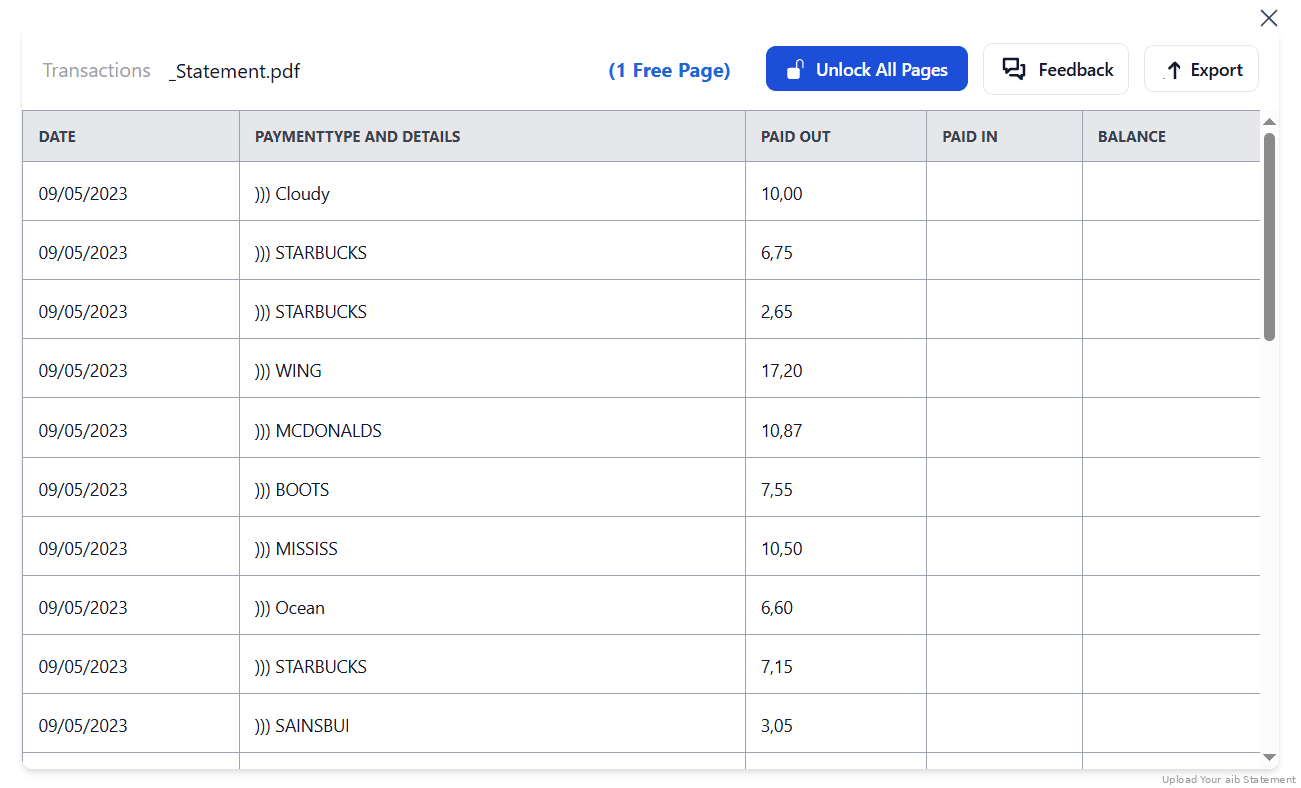
Step 4: Check result & Download your converted document instantly
Can You Convert AIB Statements Manually?
You can try copying from an AIB eStatement PDF into Excel, but Irish customers have long complained that the data structure comes out messy and hard to parse. Columns collide, wrapped descriptions split across rows, and the Debit, Credit and Balance figures don't line up where you expect them.
There are AIB-specific details to watch too. Dates are Irish DD/MM/YYYY, so a spreadsheet reading them month-first will shuffle transactions into the wrong month. Euro amounts need consistent signs before you total anything. And on Business Online, the three-month export cap means a full year is four separate pulls to reconcile by hand.
An automated converter reads the eStatement directly, keeps DD/MM/YYYY dates and Euro amounts intact, merges wrapped descriptions, and produces a consistent layout across every month, which is why the four-step method above is the reliable route for ROS filings and business reconciliation.
Frequently Asked Questions
How do I download my AIB transactions in CSV?
Use Historical Transactions in AIB Internet Banking: pick the current account or credit card from the dropdown, filter the rows you want, then click Export to save a CSV that opens in Excel. For the official statement or older periods, download the PDF eStatement and convert it with StatementSheet.
How far back can I export AIB transactions?
Historical Transactions lets you search the previous two years. On AIB Business Online, six months are available but only three months can be exported at a time, and iBB statements show the last 6 months or a maximum of 180 days. Beyond that, convert the PDF eStatements.
Can I export AIB bank statements to Excel?
You can export Recent Transactions to an Excel document (Account, Recent Transactions, Export), and Historical Transactions to CSV which opens in Excel. The official eStatement itself is PDF only, so convert it with StatementSheet for a clean .xlsx file.
Is StatementSheet secure for Irish banking data?
Yes. StatementSheet is GDPR-compliant, encrypted, and designed to handle Irish and European financial data securely.
Does StatementSheet work for both personal and business AIB accounts?
Yes. It supports personal, current, credit card and business accounts, which is especially useful on Business Online where native exports are capped at three months at a time.
Can I use the tool with scanned paper statements?
Yes. StatementSheet includes OCR technology that reads scanned PDFs and converts them into usable data formats.
Does AIB charge a fee to download PDF statements?
No. AIB gives you the option to view and print your eStatements free of charge through Internet Banking.
Tips for Organising Your AIB Bank Statements
Once you've converted your AIB statements to Excel or CSV, make the most of your data by staying organised:
- Sort by merchant, date, or amountSpot trends, track subscriptions, or identify duplicate payments.
- Confirm dates read as DD/MM/YYYYAIB uses Irish day-first dates. Before importing into Xero or Surf Accounts, spot-check early-month transactions so your spreadsheet hasn't flipped them to month-first.
- Use Excel formulas and pivot tablesIdeal for accountants combining several three-month business exports into one annual view.
- Organise your files by date and accountSave files using naming conventions such as "AIB_Current_Jan-Mar_2025.xlsx" for clarity.
- Store securely in the cloudKeep your CSV file or Excel spreadsheet backed up via encrypted storage like Google Drive or Dropbox, especially beyond AIB's two-year search window and ahead of Irish tax deadlines.
Troubleshooting Common AIB Conversion Issues
- Export cut off at three monthsOn AIB Business Online, six months of information are available but only three months can be exported at a time. Pull in batches, or convert the monthly PDF statements for a full year in one go.
- Can't search further back than two yearsHistorical Transactions searches the previous two years. For older periods, use your archived eStatement PDFs and convert those instead.
- Copy-pasted data comes out messyCopying from an AIB eStatement PDF produces a structure that's hard to parse, with columns colliding and descriptions splitting. Convert the PDF instead of pasting it.
- The statement you need hasn't been issuedUse Order Statement in Internet Banking (it covers your last statement date up to today), or tap Order More Recent Statement in the AIB app, ready the next working day. Then convert the PDF.
Final Thoughts: Take Control of Your Finances
AIB's Historical Transactions export is genuinely useful for recent rows, but it doesn't give you the official eStatement, caps business exports at three months, and stops searching after two years. With StatementSheet, converting your AIB bank statement to Excel or CSV format is fast, reliable, and compliant with Irish tax and accounting requirements.
Stop wasting hours on manual data entry or complex spreadsheet work. Convert your AIB bank statements CSV in seconds and stay ahead with organised, structured financial data.
Ready to convert your AIB bank statement to Excel or CSV?
➡️ Visit StatementSheet now and get started with the most accurate AIB CSV conversion tool bank feed accounting software professionals trust.